Key Takeaways
- Data archiving software for communications and compliance is a different category from ERP or database archiving. This guide focuses on platforms built to capture, retain, and produce email, chat, social media, mobile, website and file data for regulated organizations.
- Compliance frameworks like FINRA, SEC Rule 17a-4, HIPAA, FERPA, FOIA, and GDPR all treat “we couldn’t find it” as a compliance failure, not an IT inconvenience.
- AI is changing what buyers expect from archiving in 2026: automated classification, sentiment tagging, and conversational search over archived data are becoming baseline requirements rather than differentiators.
- Deployment flexibility matters more than most shortlists account for: cloud, on-premises, and hybrid options serve different data residency, security, and procurement needs.
- Jatheon stands out for combining the broadest channel coverage (email, social, chat, mobile, files) with AI-powered search and both cloud and on-premises deployment in a single platform.
Introduction
Producing a complete communications record on request is one of the more consistent failure points for compliance and IT teams.
Email lives in one system, chat and collaboration tools in another, and mobile activity or social media often isn’t captured anywhere at all. So, when a regulator, auditor, or records request asks for everything on a given topic or timeframe, most organizations can’t answer with full confidence in how complete that answer really is.
That risk isn’t purely theoretical, and regulators have already shown how costly it gets for organizations that treat mobile and off-channel communications as outside their compliance scope.
In December 2021, the SEC and CFTC fined JPMorgan a combined $200 million after finding that employees had routinely used WhatsApp, text messages, and personal email to discuss business without retaining any of those communications. That case opened the door to a wave of off-channel recordkeeping enforcement across Wall Street that continues today.
Data archiving software exists to close that gap. Instead of communications sitting informally across a handful of disconnected systems, it captures them into a single, immutable, and searchable repository that IT, legal, and compliance teams can depend on when a request actually comes in.
In this guide, you’ll learn:
- What data archiving software actually does, and how it differs from backup and native retention tools
- The features that separate a compliance-grade archive from a basic storage product
- How the eight leading platforms compare on channel coverage, deployment, AI capabilities, and ideal use case
What Is Data Archiving Software?
Data archiving software takes inactive or historical records out of your live systems and moves them into a long-term store built specifically for governance.
Each record keeps its metadata, and everything sits under defined retention rules, access controls, and audit integrity. Cheap storage alone doesn’t get you there.
The real goal is keeping records in a form you can defend, retrieve, and eventually dispose of on schedule. That governance focus is what separates archiving from the adjacent tools people often confuse it with.
- Archiving vs backup. A backup is a short-term copy meant for disaster recovery. It restores quickly, but it’s usually overwritten on a regular cycle and isn’t built to be searched or relied on long term. An archive works differently. It’s the authoritative long-term record, indexed for search and locked against tampering. You can restore from a backup, but you can’t reliably run ediscovery or prove message integrity from one.
- Native retention vs true archiving. Retention settings inside Microsoft 365, Google Workspace, or a messaging app can hold data in place, but the records stay inside the same system that created them, managed by the same admins, and rarely cover every channel your organization actually uses. True archiving pulls records out into an independent store with its own controls and audit trail.
Gartner now tracks this space as Digital Communications Governance and Archiving (DCGA), reflecting how many channels a modern archive has to govern.
When you’re evaluating a platform, look for six capabilities that define whether it’s a real archive or just extra storage:
- Metadata-rich ingest that captures each record with its context intact
- Automated retention that applies policies without manual sorting
- Immutability that prevents alteration or early deletion
- Fast targeted retrieval so you can find specific records under a deadline
- Legal hold that suspends disposition for records tied to a matter
- Defensible disposition that deletes on schedule and logs the action
Storage and search are the baseline, while governance is the reason the category exists.
How it works
A typical archiving deployment connects to each communication source through a journaling feed, API, or connector.
Microsoft 365 journaling handles email, an API integration captures Teams or Slack, and carrier-level capture covers mobile text and voice.
Every message is indexed with metadata (sender, recipient, timestamp, channel) and stored in a write-once, read-many (WORM) format so it can’t be altered after ingestion. From there, authorized users can search, apply legal holds, set automated retention and deletion schedules, and export records for audits or litigation.
Common use cases
- Regulatory audits and examinations, producing complete communication records for FINRA, SEC, or HIPAA examiners on request
- Public records and FOIA response, searching and exporting government communications within statutory deadlines
- Litigation holds and ediscovery, preserving specific records for a legal matter without disrupting normal retention schedules elsewhere
- HR and internal investigations, reconstructing a full communication history across email, chat, and mobile for a single employee or incident
- Legacy system retirement, migrating years of archived data off an outdated platform without losing access to historical records
What to Look for in Data Archiving Software
Not every archiving product is built for the same job.
Beyond the core capabilities that define a real archive, a handful of criteria tend to vary by organization, industry, and existing infrastructure, and are worth weighing before comparing vendors head-to-head.
- Regulatory alignment. Your organization likely answers to one or more specific frameworks, whether that’s GDPR (with fines reaching 4% of global annual turnover), HIPAA, FINRA and SEC Rule 17a-4, FERPA, FOIA, SOX, or GLBA, and the platform you choose needs to support those requirements directly.
- Channel coverage. Email used to be enough, but most organizations now need Teams, Slack, Zoom, WhatsApp, iMessage, SMS, voice, website content, and social media archived into that same searchable repository. A gap in any one channel is still a compliance gap.
- AI-assisted review. Automated classification, sentiment tagging, and conversational search have moved from nice-to-have to standard expectations in 2026, largely because they cut down the manual review time that piles up as data volumes grow.
- Deployment flexibility. Cloud, on-premises, and hybrid options let you match the platform to your data residency requirements, existing infrastructure, and internal security policy, instead of the other way around.
- Migration and support. How easily you can move off a legacy or competing archive, and what support looks like once you’re live, often ends up being the real difference between a smooth rollout and a project that drags on for quarters.
The 8 Best Data Archiving Software Platforms
Here’s how the leading platforms compare, based on public product information, analyst recognition, and verified user reviews on sites including Gartner Peer Insights, G2, and Capterra.
1. Jatheon
Best for: Regulated organizations and enterprises that need an all-in-one, AI-enabled archive covering communication compliance, supervision, and ediscovery in a single platform.
Jatheon has focused exclusively on communications archiving and compliance since 2004, and it shows in how many channels the platform covers natively rather than through third-party add-ons.
You can deploy it in two ways to fit your IT strategy.
Jatheon Cloud is an AWS-based, SOC 2 and GDPR-ready platform with multi-zone redundancy and geofencing built in, while Jatheon on-prem gives you a dedicated archiving appliance or a virtual deployment when you need data to stay on-site. Both paths run through the same search and compliance tooling.
Key features:
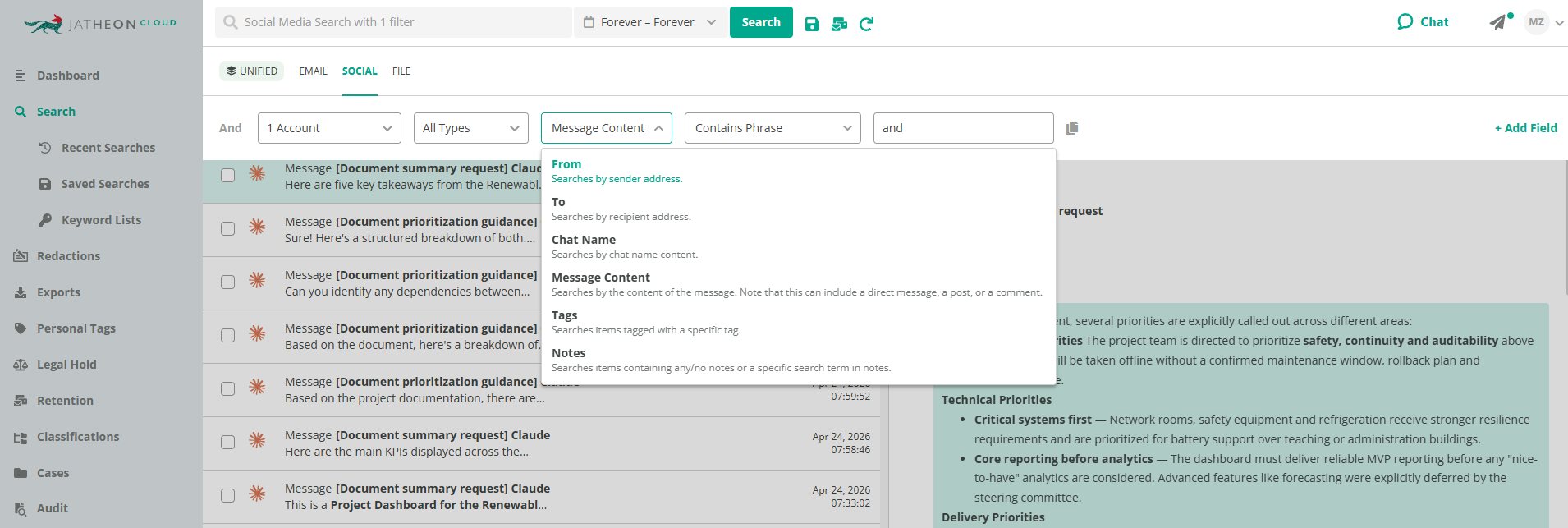
- Archives email, social media, chat and collaboration platforms (Teams, Slack, Zoom, WhatsApp, iMessage), text and calls, Claude conversations, files, and website content, searchable together through Unified Search
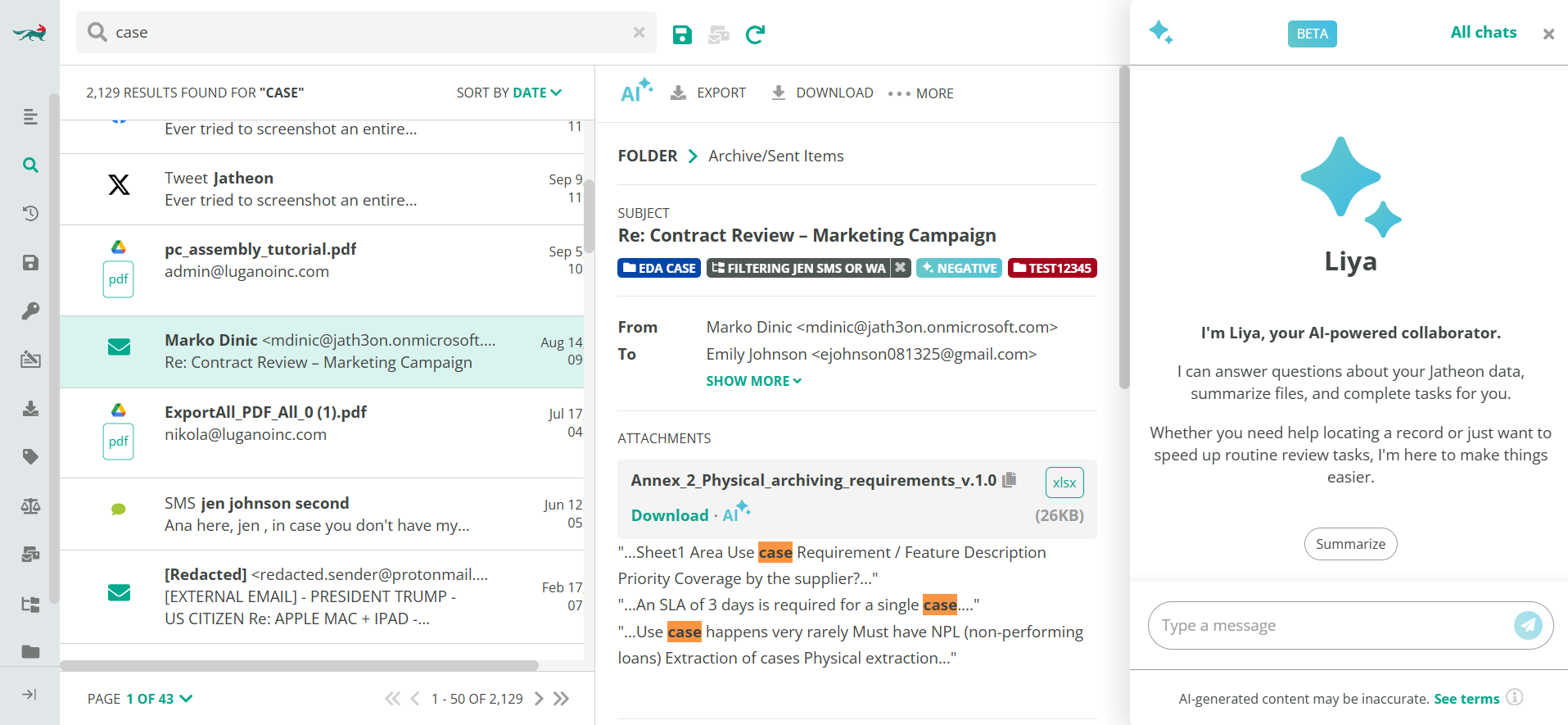
- WORM tamper-evident storage that keeps the platform SEC Rule 17a-4 and FINRA compliant, alongside retention policies, legal hold and ediscovery, audit logs, custom roles, PII redaction, and message-integrity verification
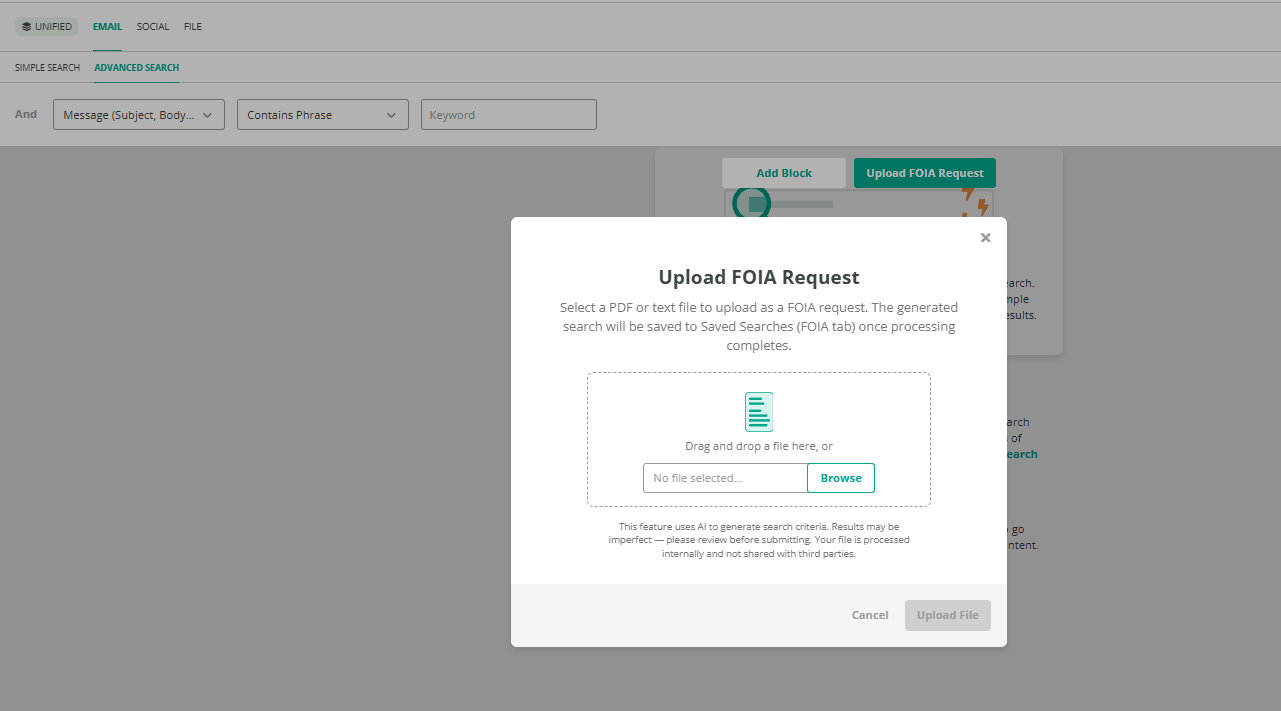
- FOIA Request Automation, which lets teams upload a request document and automatically generates the search criteria and date ranges needed to respond, cutting out the manual scoping that typically starts every public records request
- AI layer on top of the archived data, developed fully in-house, with Liya, AI assistant sentiment analysis, OCR, transcription, classifiers that cut down irrelevant search results, and risk-scoring for data governance
- A dedicated Claude AI data connector that archives every message, attachment, and deletion from employee conversations with Anthropic’s Claude, since an AI conversation becomes a business record the moment it’s used for company work
- Purpose-built archiving that handles high-volume mailbox retention without straining live systems
- Free, automated, white-glove migration from competitor systems, full data ownership, and predictable pricing
- Hosted on AWS, with multi-zone redundancy and geofencing
Strengths: Jatheon offers the widest combination of native channel coverage and deployment flexibility on this list, backed by 24/7 in-house support. It also holds the highest rating among reviewed archiving vendors on Gartner Peer Insights, at 4.9 out of 5, with 91% of reviewers saying they’d recommend it.
Limitations: Because Jatheon covers this much ground in a single platform, teams evaluating it against a single-channel point solution should expect a slightly broader onboarding conversation to map out which channels and connectors they need on day one.
Bottom line: Most regulated organizations eventually need to govern communications across more than just email, and Jatheon consolidates that requirement into one archive instead of three or four.
2. Global Relay
Best for: Large global enterprises, particularly in financial services, that need a fully managed, high-end communications governance platform.
Global Relay has spent more than two decades focused specifically on capturing and archiving communications for regulated financial firms, and its platform is built to handle the scale and complexity of large, global compliance programs.
Key features:
- Broad channel capture including email, SMS, WhatsApp, instant messaging, and voice
- Supervision and surveillance tooling built for regulated financial communications
- Ediscovery and legal hold workflows designed for large-scale litigation support
Strengths: Strong analyst recognition, mature supervision capabilities, and a long track record with large regulated enterprises.
Limitations: Pricing and implementation are generally scoped for large enterprise budgets, which can make it a heavier lift for mid-market organizations than some alternatives on this list. Data export beyond what’s included in the base contract is typically billed per gigabyte, so organizations that expect to move large volumes of data out down the line, whether for migration, litigation, or a vendor switch, should factor that into total cost of ownership.
Bottom line: A credible option for global enterprises that need top-tier communications governance and have the budget and internal resources to match.
3. Mimecast (Cloud Archive)
Best for: Organizations already using Mimecast for email security that want archiving under the same vendor relationship.
Mimecast started out as an email security company and expanded into archiving from there, which is why its platform still centers on tight integration with Microsoft 365 and Exchange rather than a ground-up multi-channel build.
Key features:
- Deep Microsoft 365 and Exchange integration
- Policy-based retention and mature ediscovery workflows
- Combined email security and archiving under one console
- Expanding collaboration coverage, including Teams and Slack, through its Aware-powered Search & Discover application
Strengths: Strong brand recognition and a mature product for organizations centered on email and Microsoft 365.
Limitations: Even with its recent expansion into Teams and Slack, Mimecast’s coverage doesn’t yet extend to mobile text, voice, WhatsApp, or social media, so organizations with those channels in their compliance footprint will still need a platform built natively for that breadth of multi-channel capture.
Bottom line: A sensible choice if your primary archiving need is email and you already rely on Mimecast for email security, but plan for a complementary tool if your compliance scope extends further.
4. Microsoft Purview (Data Lifecycle Management)
Best for: Organizations whose entire compliance footprint lives inside Microsoft 365.
Purview’s baseline retention and ediscovery live in most M365 licensing tiers, though the more advanced capabilities below, including ediscovery Premium and third-party data connectors, are concentrated in the E5 tier or sold as separate add-ons. Even so, it remains the default starting point for organizations that haven’t yet evaluated a dedicated archiving vendor.
Key features:
- Native retention and deletion policies across Exchange, Teams, SharePoint, and OneDrive
- Unified labeling and classification for Office content
- Ediscovery scoped primarily to Microsoft 365 environment data
- Third-party data connectors that can import select external sources, such as WhatsApp, LinkedIn, and Bloomberg chat, into M365 mailboxes for retention and ediscovery
Strengths: No additional procurement for organizations already on the E5 tier, and a single admin interface for Microsoft 365 governance.
Limitations: Third-party data connectors work by importing external data into M365 mailboxes rather than capturing it natively, and each one typically requires a separate partner service and added cost, on top of the E5 licensing that many of Purview’s advanced features already assume. That import-based, connector-by-connector model still falls short of the breadth and simplicity of a platform built to capture channels like mobile text and social media directly. Native retention inside M365 also isn’t the same as an independent, immutable archive with its own chain of custody.
Bottom line: A reasonable baseline for M365-centric organizations, particularly at the E5 tier, but the per-channel connector model and licensing requirements make it a heavier lift than a platform built for multi-channel capture from the start.
5. Proofpoint Enterprise Archive
Best for: Enterprises with heavy ediscovery workloads centered on email.
Proofpoint is well known in legal and compliance circles for its ediscovery tooling, particularly in financial services and healthcare litigation support. Its 2025 acquisition of Nuclei was a deliberate move to extend that same discovery-first approach into workspace and mobile channels beyond email.
Key features:
- Cloud-based email archiving with WORM immutability
- Advanced ediscovery with intelligent search and export
- Office 365 integration for unified email governance
- Expanded workspace and mobile capture through its 2025 acquisition of Nuclei, covering Teams, Slack, Zoom, Webex, WhatsApp, and RingCentral Voice
Strengths: Mature ediscovery workflows and a strong track record supporting legal teams through litigation and investigations.
Limitations: Proofpoint’s reputation and ediscovery depth are still rooted in email, and its broader workspace and mobile capture arrived through a 2025 acquisition that’s still being folded into the core platform. Organizations evaluating it for true multi-channel coverage should confirm how mature that integration is for the specific channels they need.
Bottom line: Dependable for email-centric ediscovery, with real momentum toward broader coverage, though organizations with an already-established multi-channel footprint should confirm how far that expansion currently reaches before relying on it as a full replacement.
6. Smarsh (Cloud Archiving)
Best for: Financial services firms with electronic communications supervision obligations under FINRA, SEC Rule 17a-4, or MiFID II.
Smarsh got its start capturing and supervising regulated financial communications, and has since extended that same model into dedicated public sector, education, and healthcare offerings as well, across channels including Bloomberg, WhatsApp, and Teams.
Key features:
- Capture and archiving across 80-plus communication channels
- AI-powered supervision and surveillance for regulated communications
- Cloud-native architecture built for financial services scale
Strengths: Best-in-class channel coverage specifically for regulated financial communications, with strong alignment to FINRA and SEC requirements.
Limitations: Smarsh’s brand, majority customer base, and pricing model are still calibrated around large-scale financial services compliance programs. It does offer public sector, education, and healthcare solutions, but a smaller agency, school district, or healthcare organization may find the platform sized and priced for more scale than it actually needs.
Bottom line: A strong specialist choice for broker-dealers and financial firms, with real public sector and healthcare offerings as well, though smaller organizations in those verticals should weigh whether an enterprise-scale platform matches their size and budget.
7. Google Vault
Best for: Organizations fully standardized on Google Workspace.
Google Vault is built into Google Workspace and provides a straightforward path to retention, search, and legal hold for Workspace data, though it’s included only in Business Plus and Enterprise editions, with lower tiers needing it as a paid add-on.
Key features:
- Archives Gmail, Google Drive, Google Chat, Meet recordings, Google Voice texts and call logs, Groups, Calendar metadata, and classic Sites
- Search across emails, chats, and files by keyword, date range, and metadata
- Retention rules and legal hold scoped to Workspace accounts
Strengths: Zero additional infrastructure for Workspace-native organizations and straightforward policy management.
Limitations: Scope is strictly Google Workspace. Vault’s Voice coverage extends to business texts and calls made through Google Voice specifically, but it has no way to capture personal-device messaging like WhatsApp, iMessage, or carrier SMS, and non-Google chat tools and social media remain entirely outside its scope.
Bottom line: A reasonable fit if your compliance exposure is entirely inside Google Workspace, but not built for organizations with a mixed communications stack or real exposure to personal-device and consumer messaging apps.
8. Barracuda Message Archiver
Best for: Smaller organizations that want straightforward, reliable email archiving without extensive compliance tooling overhead.
Barracuda has built a solid reputation for simplicity. It creates an unmodified copy of every message passing through a business’s mail server via SMTP journaling and stores it for retrieval, with deployment available as a hardware appliance, a virtual instance, or a cloud-connected service.
Key features:
- Automated, policy-based email archiving and retention
- Fast search and retrieval for historical messages
- Legacy instant messaging archiving for Skype for Business and Lync, though not for modern platforms like Teams or Slack
- Straightforward setup aimed at smaller IT teams
Strengths: Ease of use and reliability at a price point that fits SMB and lower mid-market budgets.
Limitations: Coverage is primarily email-focused. Its only chat archiving support targets the now largely retired Skype for Business and Lync platforms, with no coverage for modern collaboration tools like Teams or Slack, let alone social media or mobile capture, the way platforms built for multi-channel compliance provide.
Bottom line: A dependable, budget-friendly option for organizations whose archiving needs are simple and email-centric, though its chat coverage hasn’t kept pace with how teams communicate today.
Side-by-Side Comparison
| Platform | Channels covered | Deployment | AI-powered search | Best-fit buyer |
| Jatheon | Email, social, chat/collaboration, mobile/voice, files, website content, Claude chats | Cloud, on-prem, hybrid | Yes (Liya AI copilot, classification, sentiment) | Multi-channel compliance across government, finance, healthcare, education |
| Global Relay | Email, chat, mobile/voice, social | Cloud | Growing AI features | Large global regulated enterprises |
| Mimecast | Email, M365, expanding to Teams and Slack | Cloud | Limited | Organizations already using Mimecast for email security |
| Microsoft Purview | M365 apps, plus select third-party channels via paid connectors | Cloud (native M365) | Growing (Copilot-integrated) | Organizations entirely inside Microsoft 365 |
| Proofpoint | Email, expanding to Teams, Slack, WhatsApp, and voice via 2025 acquisition | Cloud | Limited | Email-heavy ediscovery workloads |
| Smarsh | 80+ channels across finance, public sector, education, and healthcare | Cloud | Yes | Large-scale financial services and enterprise-scale regulated organizations |
| Google Vault | Gmail, Drive, Chat, Meet, Voice, Groups, Calendar, Sites | Cloud (native Workspace) | Limited | Organizations entirely inside Google Workspace |
| Barracuda | Email, plus legacy Skype for Business/Lync IM | Hardware, virtual, or cloud | Limited | SMB/mid-market, email-focused needs |
Conclusion
The right platform depends on your organization’s actual mix of channels, not on which vendor has the longest feature list. Microsoft Purview and Google Vault work well only if you live entirely inside one ecosystem. Global Relay, Smarsh, and Proofpoint each cover real ground, but around a specific kind of buyer, whether that’s global enterprise scale, financial services supervision, or heavy ediscovery caseloads.
FAQ
What regulations require organizations to archive communications data?
Retention periods vary by framework. SEC Rule 17a-4 requires broker-dealer records to be kept three to six years, HIPAA-related documentation for at least six years, and SOX audit records for seven years. GDPR sets no fixed period at all, requiring only that data isn’t kept longer than necessary, while FOIA and state records laws vary by jurisdiction.
Is archived data legally admissible in court?
Archived data can serve as strong evidence, but admissibility depends on more than having a copy of a message. Courts generally look for an unbroken chain of custody, proof that the data hasn’t been altered, and complete metadata, which is exactly what WORM-based archiving platforms are built to provide, though the final call always rests with the court.
How long does it take to migrate from a legacy archiving system?
Timelines vary with data volume and source systems, but the biggest factor is whether the vendor has done that specific migration before. Vendors with 30 or more established migration paths can typically move you over with minimal disruption, while less experienced migrations can stretch into multi-quarter projects.
What happens to your data if you switch archiving vendors?
It depends on the vendor, since not all platforms make it easy. Some charge substantial per-gigabyte export fees, especially for full-environment exports at contract termination, so it’s worth confirming the export format, fees, and timelines before you sign rather than after you’ve decided to leave. Platforms that guarantee smooth migration and full data ownership, like Jatheon, remove that risk entirely.
Read Next:Top Gaggle Alternatives for K-12 Email Archiving FOIA and Public Records Software: How To Stay Compliant Ediscovery Software Comparison: Best Ediscovery Solutions for This Year |