
FERPA gives parents the right to see their child’s education records within 45 days. Those records now sit in email, text messages, chat apps, shared drives, video recordings, and AI tools.
Archiving for FERPA compliance means capturing all of those channels in one system and controlling who can reach each record and when it gets deleted. A district that can’t see a channel also can’t spot FERPA violations that happen there or produce the records when a parent asks for them.
This guide explains what FERPA requires, which records it covers, and where those records live in a typical district today. It then maps FERPA compliance requirements to archiving controls and ends with a FERPA compliance checklist for IT and records teams.
What FERPA Requires From Schools
The Family Educational Rights and Privacy Act (20 U.S.C. § 1232g) and its regulations at 34 CFR Part 99 apply to any school or district that receives U.S. Department of Education funds, which includes public K-12 districts.
FERPA compliance means honoring parents’ rights to access and correct records, getting consent before disclosing them, and keeping student information away from staff who don’t have a legitimate educational interest.
These rights transfer from parents to the student at 18 or when the student enrolls in a postsecondary institution. Each one depends on the district knowing where its records are and who has seen them.
Notify parents of their FERPA rights every year
The annual notice explains how to inspect and amend records.
If the district shares records with school officials, it also defines who counts as one and what counts as a legitimate educational interest.
Give parents access to records within 45 days
Districts must let parents inspect education records within 45 days of a request.
They can’t charge for searching or retrieving the records, and they can’t destroy any record covered by a pending request. When a record covers several students, such as a group email or class chat thread, other students’ details have to be redacted before the parent sees it.
Handle requests to correct a record
Parents can ask the district to amend a record they believe is inaccurate or misleading, and they can request a hearing if the district refuses.
If the record stands, the parent can add a statement of disagreement, which must stay with the record for as long as it exists.
Get written consent and log disclosures to outside parties
Outside the exceptions below, a district needs signed and dated written consent before it discloses personally identifiable information (PII) from an education record.
Disclosures to outside parties made without consent have to be logged, and the log stays with the student’s records for as long as they’re kept.
Disclose without consent only under FERPA’s exceptions
Section 99.31 of the regulations allows disclosure without consent to:
- School officials and vendors with a legitimate educational interest
- Another school where the student is enrolling
- Education authorities conducting audits or evaluations
- Researchers working under a written agreement
- Courts, under a judicial order or subpoena
- Parties responding to a health or safety emergency
- Anyone requesting directory information
Even under the school official exception, access controls have to limit staff to the records they have a legitimate educational interest in.
Define directory information and honor opt-outs
Directory information, such as name, grade level, photo, and sports participation, can be released without consent once the district publishes what it covers and gives parents time to opt out.
It never includes a Social Security number, and an opt-out stays in force after the student leaves.
What Counts as an Education Record
An education record is any record directly related to a student and maintained by the district or by a party acting for it, such as a vendor.
FERPA defines a record as information “recorded in any way,” including computer media, video, and audio, so a text message or a recorded video call can qualify the same way a paper file does.
Email is where the definition gets contested. Courts have split on whether every email about a student is “maintained” by the school. In S.A. v. Tulare County Office of Education (2009), a federal court held that emails outside a student’s permanent file weren’t education records. The American Association of Collegiate Registrars and Admissions Officers (AACRAO) has asked the Department of Education to settle the question.
Until it does, the safer practice is to treat any message directly about a student as a potential education record and keep it where your district can find it.
The table shows how common K-12 records usually fall under the definition.
| Record | Education record? | Why |
| Grades, report cards, and transcripts | Yes | Directly related to the student and kept by the school |
| Attendance and disciplinary records | Yes | Directly related to the student and kept by the school |
| IEP and Section 504 plans and evaluations | Yes | Special education records are also covered by IDEA confidentiality rules |
| Health and counseling records kept by school staff | Yes | The treatment records exclusion applies only to students 18 or older or in postsecondary education |
| Emails, texts, and chat messages about a specific student | Often | Depends on whether the district maintains them; courts disagree |
| Video the school uses to discipline a student | Yes | Directly related to each student it’s used to discipline |
| Directory information, such as name and grade level | Yes | Part of the record, but disclosable without consent after public notice and an opt-out window |
| Video kept by the school’s law enforcement unit for a law enforcement purpose | No | Law enforcement unit records are excluded |
| A teacher’s private notes used only as a memory aid | No | Sole possession records are excluded if no one else sees them |
| Grades on peer-graded papers before the teacher collects them | No | Not yet maintained by the school |
| Records on staff who aren’t employed because they’re students | No | Employment records are excluded |
| Records created after a student leaves that aren’t about their attendance | No | Post-attendance records are excluded |
One record can belong to several students at once. The Department’s own example is a bus surveillance video of two students fighting that the school uses to discipline both, which makes it the education record of each.
Where Education Records Live Today
FERPA was written for paper files, but student information now moves through many systems that IT may or may not capture.
Each channel below can hold messages and files directly related to a student, and each one needs a plan for capture and retention.
Email still carries most of the formal correspondence about students, from parent conferences and counselor notes to IEP scheduling and discipline follow-ups.
Mailbox retention settings rarely match a records schedule, and when a teacher leaves and their account is deleted, the messages about their students can go with it.
Email archiving keeps a copy outside the mailbox from the moment a message is sent or received.
Text messages, RCS, and iMessage
Coaches, teachers, and administrators text parents from district phones every day.
Carrier-level archiving captures SMS but misses iMessage and RCS, which are now the default on most smartphones, so many districts have a gap in their SMS archiving they haven’t noticed.
Device-level text message archiving captures all three protocols.
Microsoft Teams, Google Chat, and Slack
Staff use chat to coordinate on attendance, behavior plans, and special education services, often in group channels where several students come up in one thread.
Those conversations are harder to search and export than email, which matters when a parent asks for every record about their child.
Collaboration tools archiving captures Teams, Google Chat, and Slack in their native threaded format.
Social media
District and school accounts post student photos, award announcements, and game results, and they receive comments and direct messages from parents and students.
A post that identifies a student whose parents opted out of directory information is a disclosure problem, one of several social media risks for school districts, and a deleted post can still be a public record.
Social media archiving preserves district posts and comments in one searchable place.
Google Drive, OneDrive, and SharePoint
Shared drives hold IEP drafts, gradebook exports, intervention spreadsheets, and scanned forms.
Files get copied, renamed, and shared with outside accounts, which makes it hard to know which version is the record. Jatheon captures Google Drive, OneDrive, and SharePoint files alongside the messages that reference them.
Zoom recordings
Virtual IEP meetings, parent conferences, and recorded classes can all contain information directly related to a student.
Recordings sit in individual host accounts, where deletion follows account settings rather than the district’s records schedule. Zoom capture moves them into the archive, where AI transcription turns the audio into searchable text.
AI chat tools
Teachers and counselors now use AI assistants to draft IEP goals, summarize behavior notes, and write parent emails, and the prompts often include student names and details.
Enterprise AI accounts keep those conversations, and a prompt or response directly about a student can meet the education record definition.
Jatheon’s Claude AI connector captures prompts, responses, attachments, and deleted chats so they fall under the same retention and access rules as email.

The district website
Websites publish honor rolls, athletic rosters, newsletters, and photos, all of which can include directory information.
If a parent says their child appeared online after they opted out, the district needs to show what the page looked like and when. Website archiving earlier versions of district pages, so the district can produce that evidence.
Does FERPA Require Schools to Archive Records?
FERPA doesn’t set a general retention period or require a district to keep any particular record. It governs access to and disclosure of the records a district does keep.
Three provisions still limit when records can be deleted:
- A district can’t destroy a record while a request to inspect it is pending.
- The log of disclosures to outside parties has to stay with the student’s records for as long as those records exist.
- A parent’s statement disputing a record has to stay with that record for as long as the record exists.
The access and disclosure rules also assume the district can find its records.
A 45-day deadline is hard to meet when the relevant messages are spread across mailboxes, phones, and chat workspaces, and a district can’t control or log disclosures from a system it doesn’t see.
FERPA never uses the word “archive,” but complying with it depends on records being captured, searchable, and access-controlled.
State retention schedules set the timelines
State records laws decide how long each type of student record must be kept, usually regardless of format.
Texas’s Local Schedule SD for public school districts is one example.
It applies to records in any medium, including email and websites. High school academic achievement records must be kept permanently, K-8 cumulative records for five years after withdrawal, and special education records for five years after services end. Destroying a record before its retention period ends is a Class A misdemeanor in Texas.
Because schedules like this one work by record type, an email or chat message is kept for as long as the record series its content belongs to.
A message about a suspension follows the discipline schedule, and a message about IEP services follows the special education schedule.
A district that applies one blanket email retention period will keep some records too long and delete others too early.
Public records requests
Public districts also answer state open records requests, often called FOIA or sunshine law requests.
Records protected by FERPA are generally withheld from those requests because releasing them would violate federal law. When a court decides an email about a student isn’t an education record, though, it can become a public record.
In both cases, the district has to find the messages, decide which law governs each one, and redact what it can’t release.
Legal holds
Once litigation is reasonably anticipated, a district has to preserve relevant records regardless of its retention schedule.
Texas’s schedule also bars destroying records involved in litigation, audits, claims, or public information requests until the matter is resolved. A legal hold has to reach every channel where those records live, including texts, chat, and video.
FERPA Compliance Requirements Mapped to Archiving Controls
FERPA compliance requirements each translate into something your archive has to do. The table pairs the rule with the control that supports it, so IT and records teams can check their current setup line by line.
| FERPA requirement | Where it comes from | Archiving control |
| Give parents access within 45 days, with no fee for searching or retrieving records | 34 CFR § 99.10 and § 99.11 | Search across every channel by student, parent, or staff member, with export in a readable format |
| Show a parent only their own child’s information | § 99.12(a) | Redaction of other students’ names and details before export |
| Don’t destroy records covered by a pending access request | § 99.10(e) | A hold that suspends deletion for records tied to an open request |
| Keep a parent’s statement with the contested record | § 99.21(c) | The original record preserved unaltered, with notes or linked documents attached |
| Limit staff to records they have a legitimate educational interest in | § 99.31(a)(1)(ii) | Role-based access scoped by school, department, or role |
| Log requests and disclosures to outside parties | § 99.32 | An audit log of every search, view, and export |
| Honor directory information opt-outs | § 99.37 | Tags that flag opted-out students so their records get reviewed before any release |
| Use reasonable methods to protect records | § 99.31(a)(1)(ii) | Encryption in transit and at rest, WORM storage, and multifactor authentication |
| Keep the archiving vendor under the district’s direct control | § 99.31(a)(1)(i)(B) and § 99.33 | A contract that limits the vendor’s use of data, bars redisclosure, and covers return or deletion at termination |
| Dispose of records on schedule, except under hold | State retention schedules | Automated retention policies by record type, with legal hold overriding deletion |
None of these controls replaces a district policy. An archive can enforce role-based access, but someone still has to decide which roles have a legitimate educational interest in which records.
FERPA Compliance Checklist for Data Archiving
This FERPA compliance checklist covers the archiving side of student privacy. Work through it with IT, your records officer, and whoever handles parent requests, since most items need decisions from all three.
- Name an owner: Assign one person, usually the records officer, to own this checklist and sign off on retention and access settings.
- Inventory every channel: List each system that holds student information, including email, district phones, chat, shared drives, video meetings, AI tools, social media, and the website. Note which ones your archive captures today.
- Map records to your state schedule: Match each type of student record to its retention period in your state’s schedule, and confirm the schedule applies to electronic records in your state.
- Set retention by record type: Configure retention policies around content categories such as discipline, special education, and health, not around channels or mailboxes.
- Capture automatically, including departing staff: Make capture continuous so records don’t depend on staff saving them, and confirm accounts are archived before they’re deleted.
- Define access by role: Write down which roles have a legitimate educational interest in which records, publish those criteria in your annual notice, and configure archive permissions to match.
- Turn on audit logging: Log every search, view, and export, and make sure you can produce the record of disclosures for any student on request.
- Flag directory information opt-outs: Tag students whose parents opted out, and keep the tag after the student leaves.
- Build an access request workflow: Document how a request moves from intake to search, review, redaction, and export, and track the 45-day deadline from the day the request arrives.
- Set up holds that override deletion: Make sure legal holds and holds for pending access requests stop automated deletion across every channel.
- Review vendor contracts: Confirm each archiving and edtech vendor meets the school’s official conditions, including direct control over data use, no redisclosure, and return or deletion of data when the contract ends.
- Approve channels and train staff: Tell staff which channels they can use with parents and students, and which they can’t, such as personal phones and consumer AI accounts. Cover the same rules in annual FERPA training, along with how to route a parent’s records request to the records team.
- Plan for unauthorized disclosures: Decide who investigates when student information reaches the wrong person, and use archive search and audit logs to confirm what was sent, to whom, and when.
- Test once a year: Run a sample access request end to end, send test messages through each channel to confirm capture, and fold the results into your information governance review.
FERPA and Other Laws That Affect Student Records
FERPA isn’t the only law that touches student records. Three others come up most often in archiving decisions:
- State open records laws: Often called FOIA or sunshine laws, they give the public access to district records, including email, texts, and social media posts. Federal FOIA covers only federal agencies, so a district’s obligations come from state law.
- COPPA: The Children’s Online Privacy Protection Act governs online services that collect personal information from children under 13. It applies to vendors, but a district that consents on parents’ behalf for classroom tools takes on the job of vetting them.
- HIPAA: Health records a K-12 school maintains are usually education records under FERPA, which puts them outside the HIPAA Privacy Rule. HIPAA can still apply to providers that aren’t acting for the school.
IDEA, PPRA, CIPA, Title IX, and state student data privacy laws each add recordkeeping duties of their own, covered in detail in regulatory mandates for K-12 education compliance.
How Jatheon Supports Archiving for FERPA Compliance
Jatheon gives districts one archive for email, texts, chat, files, video, social media, and AI tools, with the controls the requirements above depend on.
The archive supports FERPA compliance, while decisions about access criteria, annual notices, and disclosures stay with the district.
Capture across every channel
Jatheon captures email, text messages including iMessage, Teams, Google Chat, Slack, Zoom, Google Drive, OneDrive, SharePoint, social media, Claude, and the district website in one education archive.
Student mailboxes are archived at no extra cost, and social media archiving is free for email archiving customers.
Retention tags and legal hold
Retention tags apply retention periods by content type, department, or user, so FERPA-related records such as discipline, special education, and health files each follow their state schedule.
Policies can be applied retroactively to data already in the archive, and legal hold stops deletion for any record tied to litigation, an audit, or a pending access request.
Role-based access and audit logs
Permissions can be scoped by role, department, or location, so a school counselor and the district records officer see different sets of records.
Every search, export, policy change, and user action goes into a tamper-evident audit trail that shows who accessed a student’s records and when.
Search and export for parent access requests
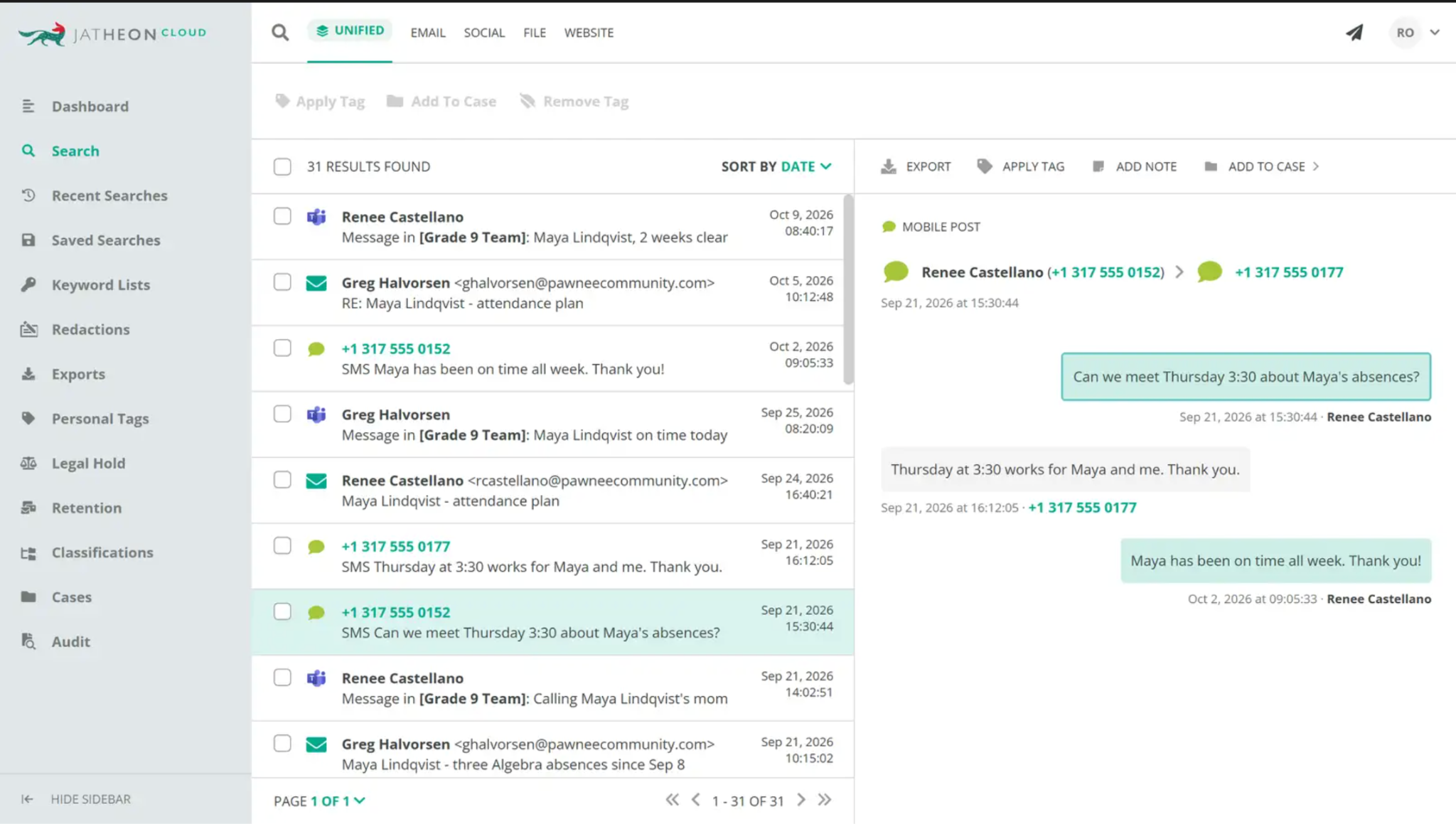
AI-enabled Unified Search looks across every archived channel at once, and Liya, Jatheon’s AI assistant, answers questions about the results in plain language. Records staff can pull everything about one student into a single result set and export it to PDF for the parent.
Redaction before disclosure
Built-in PII redaction removes other students’ names and details before export.
The same tool handles the redactions an open records response needs, so staff don’t have to black out documents by hand.
FOIA request automation
For public records requests, staff upload the request as a PDF or text file, and Jatheon turns its language into search criteria.
Saved criteria and date ranges can be reused for similar requests, and results land in a dedicated FOIA category.
Migration from legacy archives
Districts moving off an older archive can bring their history with them through automated, zero-downtime migration handled by Jatheon engineers, so years of student correspondence stay searchable.