

Key Takeaways
- Archiving preserves emails in searchable storage, while deleting removes them permanently after the trash retention window ends.
- For regulated organizations, deleting emails before the retention period expires can create compliance and legal risk.
- Gmail and Outlook’s “Archive” button helps manage the inbox, but it is not the same as compliance-grade email archiving.
- Enterprise archiving solutions add legal hold, retention policies, audit trails, and advanced search.
- Deletion is appropriate only after retention obligations expire and no litigation hold applies.The “archive vs delete emails” dilemma has real compliance, legal, and operational consequences for organizations that rely on email as a business record. The wrong choice can expose you to data loss, spoliation claims, and failed audits.
If you’re deciding whether emails should be archived or deleted, it helps to separate everyday inbox management from compliance-grade retention.
In this guide, you’ll learn:
- What email archiving is and how it can help you manage records
- The reasons behind email archiving
- Concerns regarding storage capacity vs archived emails
- What happens when you archive an email
- Pros and cons of deleting emails
Should You Delete Emails (and When)?
Most people, by default, delete their emails rather than archive them. When asked why, they often say it’s to manage their email, keep their inbox organized, or reduce mailbox clutter.
Gmail provides 15 GB of storage for free sharing across Gmail, Google Drive and Google Photos. That space fills up faster than most users expect, especially when Drive and Photos compete for the same quota.
In other words, if you use your email like most of us do — to store text-based messages along with some small attachments — you will have to work very hard to fill your email account.
Even after the introduction of folder structure, which allows us to organize and save important emails in specific locations for later use, we still feel pressured to delete some emails.
When you delete an email, it gets moved to a trash folder, where it is usually deleted after a period of time automatically (e.g., in Gmail, this period is 30 days) and is no longer accessible or retrievable.
Another thing to bear in mind here is the storage space issue: when you move emails to the trash folder, they will still take up space until you empty the trash folder.
When deletion is the right call
- After the regulatory retention period expires
- Spam and phishing emails (mark them as spam first, then delete them)
- Personal emails with no business relevance
- Data subject deletion requests under GDPR or state privacy laws
Organizations should document their deletion policies and apply them consistently to avoid selective-deletion claims during litigation.
What about the double-deletion of emails?
Double-deletion is when you delete an email message from your inbox and then immediately delete it from the trash folder as well.
This is an everyday occurrence, as some organizations still impose mailbox size limits to stop employee mailboxes from getting out of hand and causing performance issues on the email system.
Courts have penalized organizations where employees deliberately double-deleted emails to conceal communications during active litigation. In these cases, the deletion itself became evidence of spoliation, resulting in sanctions, adverse inference instructions, or both.
Enterprise archiving solutions help prevent this by capturing a journaled copy before the email reaches the user’s mailbox. Even if a user deletes a message from both the inbox and trash, the archived copy remains intact and tamper-proof.
It’s worth mentioning that double-deleting emails is not illegal as long as there’s no duty or regulation mandating their preservation.
But, once a duty, notification of impending litigation, or an audit is anticipated or received, organizations are legally required to keep all their electronically stored information in a format that ensures data integrity.
In summary, although double-deletion may not always be illegal, a definite gray area can lead to major ramifications if litigation arises.
Other, more recent examples of how technology can be abused include employees who conspired, gossiped, and planned embezzlement through email drafts or vanishing Instagram messages.
Why Deletion Alone Doesn’t Work for Business Email
For organizations with active retention obligations, routine deletion creates real compliance and legal exposure. The question isn’t whether to delete, but when deletion is defensible and when archiving is the only safe option.
But what if the inbox we’re talking about is your company inbox, where you receive all kinds of business-critical information that you often need to refer to or that mustn’t be compromised in any way?
Or, what if you work in a public company that must maintain compliance with Sarbanes-Oxley and preserve all digital communications (email included) for five or more years?
In these cases, as tempting as email deletion seems, it’s safer and more cost-effective to archive emails because it gives you the freedom to remove them from your system without the risk of breaking any compliance laws.
| Criteria | Archive | Delete |
| Where the email goes | Moved to archive storage (separate server or “All Mail” folder) | Moved to Trash, then permanently removed after 30 days |
| Recoverability | Fully recoverable at any time | Recoverable only during the Trash retention window |
| Storage impact (primary mailbox) | Frees up mailbox space | Frees up mailbox space after Trash is emptied |
| Searchability | Fully indexed and searchable by keyword, sender, date, attachment | Not searchable after permanent deletion |
| Compliance risk | Low: meets retention and ediscovery obligations | High: may violate retention regulations and trigger spoliation claims |
| Audit trail | Yes: timestamped, tamper-proof | No audit trail after permanent deletion |
| Legal hold support | Yes: emails can be placed on hold | No: deleted emails cannot be placed on hold |
| Best for | Regulated industries, litigation readiness, long-term records | Spam, expired-retention emails, personal non-business messages |
What Is Email Archiving?
Email archiving is an automated process during which all incoming, outgoing, and internal emails in an organization are captured, indexed, deduplicated, and archived either in a secure cloud environment or on an in-house appliance. Archived emails form a searchable, tamper-resistant record of business communications that supports retention, retrieval, and compliance requirements.
Email archiving was originally used for compliance and storage management purposes but is now viewed as a fundamental part of corporate information governance and electronic records management. Unlike backup, which is used for disaster recovery of recent data, archiving is designed for long-term indexed retrieval, retention enforcement, and compliance.
Consumer Email Archiving vs. Enterprise Email Archiving
In consumer email platforms like Gmail and Outlook, the “Archive” button usually moves a message out of the inbox into “All Mail” or an “Archive” folder on the same server. It helps with inbox management, but it does not create immutable storage, enforce retention, or apply legal hold.
Enterprise email archiving works differently. It captures a separate copy of each email, preserves metadata, indexes content for search, and applies retention rules, audit trails, and compliance controls designed for litigation, investigations, and audits.
This distinction matters because organizations that rely on a native archive button for compliance can still face data loss, spoliation claims, and failed audits. If you’re evaluating alternatives to basic mailbox tools, review these features to look for in a cloud archiving solution.
Why Organizations Archive Email
In short, email archiving preserves emails and helps you manage your records more efficiently.
Compliance and legal readiness
This means that with email archiving, you can:
- Respond faster to ediscovery requests in investigation or litigation cases
- Recover lost or deleted emails
- Shorten the time for audit response
- Preserve the intellectual property contained in the emails
- Optimize the storage capacity of your server
- Ensure email backup in case of a disaster to maintain the continuity of your business
- Monitor internal and external communication
- Allow authorized users to set legal hold tags
- Set custom retention and purge policies
Email archiving is the perfect way to deal with emails containing private and sensitive information.
Operational benefits
There are several reasons for archiving emails since this practice allows you to:
- Stay compliant with federal and industry-specific regulations.
- Protect your business in potential legal actions.
- Preserve server space.
- Keep your email data organized.
- Have access to all business records at any given time.
- Protect your data from hardware failures, accidental deletions, or cyber incidents.
- Minimize the risks and liabilities that can arise from poor records management.
In some cases, companies are required by law to retain their emails (since those emails are regarded as official business records) for a certain period of time.
Depending on the industry you work in, this retention period can vary. For example, under FERPA, schools need to preserve their emails for five years, whereas in healthcare, all information subject to HIPAA must be retained for seven years.
However, you can choose to keep your emails in the archive for longer than prescribed by law.
On the one hand, this might be a good decision because a longer retention period will ensure business continuity and allow you to rely on old emails to decipher past business decisions.
But be careful — the longer you keep your emails in the archive, the bigger the risk that someone might jeopardize them. Also, if you keep your emails in the archive longer than required, you increase the chances of being caught up in a legal investigation that you could have otherwise avoided legally

How to Decide Whether to Archive or Delete an Email
- Is the email subject to a regulatory retention requirement? If yes, archive it.
- Is there active or anticipated litigation involving this sender, recipient, or topic? If yes, archive the email and apply legal hold.
- Has the retention period expired and no litigation hold applies? If yes, delete the email according to your retention policy.
- Is it spam, phishing, or purely personal? Mark spam or phishing as spam first, and delete personal emails with no business relevance.
- Unsure? Archive it. The cost of over-retaining for a short period is lower than the cost of spoliation.
What Happens When You Archive an Email?
So, what does archiving an email do in practice, and what happens to archived emails?
Once you set up archiving in your company, each email sent or received by someone in your organization, along with all its metadata (sender, date and time, recipient, information on attachment, attachment itself), is captured.
It can either be captured directly from the content of the email (a process called journaling) or during the message transit.
In many environments, the archive also deduplicates messages, storing one copy of an email sent to multiple recipients to save space and simplify search.
In most enterprise setups, the user’s inbox behavior doesn’t change because the archive captures a copy via journaling rather than moving the original message.
Once the entire content of the email is captured, it gets indexed. Indexing is a process during which all the content of a message is “broken down” against a set of criteria and then stored in the archive so that all the information is preserved in a smarter and more accessible way. This works the same way you index all the books in a library (e.g., according to period, writer, country, genre, etc.).
By breaking down the content of each message, indexing makes all messages and attachments searchable. This comes in handy not only when employees need to find a particular email quickly. It also matters in case of pending litigation, when relevant emails need to be located, put on legal hold and presented as evidence within a specified time frame.
After the messages are indexed, they are stored securely in an impenetrable, tamper-proof vault that only admins, compliance officers, and other privileged users can access and manage. All messages are time and date-stamped in order to preserve data integrity and prevent evidence spoliation.
And since most archiving software nowadays comes with advanced search capabilities, you can now search through millions of archived emails and locate the critical one in seconds.
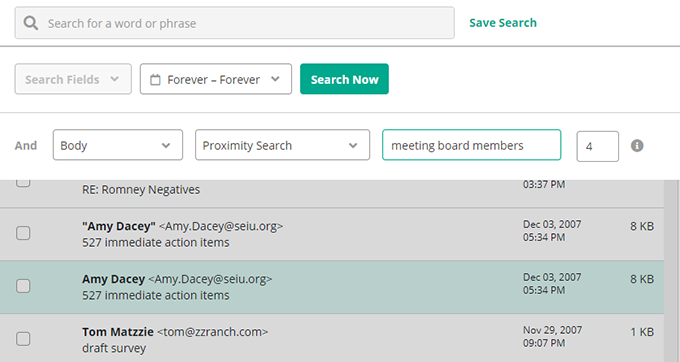
With advanced search, you can look for an email using a set of various criteria based on content in the body, sender, or recipient fields, as well as in the attachment, or by running a search for an email using a particular phrase.
Unlike what happens when you delete an email and it’s lost forever, archiving gives you the option of rediscovering it.
Does Archive Mean Delete?
No. When you archive emails, they will only be moved from your inbox to your archive and not deleted, which means you can access them at any point. This is done in near real time, and is a neat way to organize your inbox, but still preserve all relevant documents that you can easily retrieve and export into a variety of formats at a later time.
You’ll then be able to delete the emails from your inbox without worrying whether you’ll be able to retrieve them in case you need to refer to anything later.
How Long Do Emails Stay in the Archive?
As long as you need them to. The period for which you preserve your records depends on the purpose of the records. Depending on which archiver you use, you can set custom retention periods and keep the emails for as long as you want.
Think of it this way. After a project is finished, you might think you’ll never need to read or use a particular email again.
But what if a similar project comes up, and you need a glance at the previous one?
We always hope for the best, but what if your company gets sued in relation to this project and all communication detailing its implementation needs to be presented as evidence in court?
It could cost your company money and reputation to start searching for an email that can save your business only to realize that you deleted it a year ago.
Here is a list of most retention periods by industry, as prescribed by relevant regulations:
| Industry | Regulation / Regulatory Body | Retention Period |
| All | Internal Revenue Service (IRS) | 7 years |
| All (Government + Education) | FOIA / NARA records schedules | Varies by records schedule and jurisdiction |
| All public companies | Sarbanes-Oxley (SOX) | 7 years |
| Education | FERPA | 5 years |
| Financial | Gramm-Leach-Bliley Act (GLBA) | 7 years |
| Financial (Banking) | FDIC | 5 years |
| Financial (Brokers, dealers, investment bankers, securities firms) | FINRA, SEC 17a-4, SEC 17a-3 | 7 years |
| DOD contractors | DOD 5015.2 | 3 years |
| Credit card companies | PCI DSS | 1 year |
| Healthcare | HIPAA | 7 years |
| Pharmaceutical | FDA | 2 years |
| Telecommunications | FCC | 2 years |
Some email archiving systems let you create an unlimited number of retention policies, so you can choose to assign different retention periods with a lot of flexibility. For example, you could decide to keep C-level executives’ emails, employment contracts, and financial reports indefinitely while discarding HR email records after seven years, intern records after one year, and so on.
Who Should Be Archiving Emails?
While email archiving has not yet been universally adopted across all industries, it is already essential for organizations that operate in regulated or highly scrutinized environments.
Email archiving is especially important for:
- Financial services firms subject to SEC and FINRA rules
- Healthcare organizations subject to HIPAA
- Public companies that must comply with SOX
- Government agencies responding to FOIA and open records requests
- Education institutions subject to FERPA
- Any organization facing litigation, internal investigations, or regulatory audits
Even organizations without an explicit archiving mandate benefit from archiving for ediscovery readiness, internal investigations, and defensible retention.
This reasoning is grounded in the fact that the volume and data formats are going up year after year. At the same time, most of these data types are regarded as official business records, so companies will be legally required to preserve them for reference.
Meanwhile, some industries like government and education have been archiving emails for years now.
Summary of the Main Points
So, now that we’ve explored the “archive vs delete emails” dilemma, let’s sum things up.
- Deleting removes emails from your inbox and, after the trash window ends, permanently erases them.That can create financial, legal, and compliance risk when records must be preserved.
- Archiving also frees up storage space by capturing and storing emails in an archive, whether through an on-premise archiving solution or a modern cloud archiving solution. It also indexes messages and attachments so you can find them quickly.
- Archiving goes beyond inbox management by supporting supervision and policy enforcement across communication channels. This helps organizations detect issues early and respond faster.
- Archiving refers not only to emails but also to electronic records in other formats, including text, voice calls, social media, and WhatsApp messages. This matters because all of this content can qualify as official business records.