
Key takeaways
- Website archiving captures and preserves all web content in tamper-proof storage to meet regulatory and legal requirements.
- SEC, FINRA, FOIA and state open-records laws all contain provisions that can require organizations to archive website content.
- Screenshots, content management system (CMS) backups and manual downloads don’t produce defensible, audit-ready website records.
- Compliant website archiving requires automated capture of dynamic content, WORM storage, timestamping and advanced search.
- Organizations that already archive email and social media often overlook website content, creating a gap that regulators are starting to enforce.
Introduction
Six months after a product performance claim goes live, your marketing team redesigns the page.
Then a regulator asks what your website said on a specific date.
If you don’t have a proper archive, you have nothing to show. No record of what was published, when it changed, or who approved it. That gap is exactly what regulators are starting to close in on.
Most organizations have made solid investments in email archiving, chat retention and social media capture. But the website, one of the most public-facing channels a regulated organization runs, often falls through the cracks.
In this guide, you’ll learn:
- What website archiving is and how it differs from website backups
- Which SEC, FINRA and government regulations require or imply website archiving
- Why screenshots, CMS exports and other manual methods fail compliance standards
- What features to look for in a compliant website archiving solution
- How website archiving fits into a broader multi-channel compliance strategy
What Is Website Archiving?
Website archiving is the process of capturing all content published on a website and storing it in a secure, searchable archive. That includes text, images, videos, forms, interactive elements and metadata. The goal is to preserve a complete, point-in-time record of what was publicly visible on a web page at any given moment.
This is different from a website backup, which exists to restore functionality after a failure, such as a server crash, a bad deployment or a ransomware attack. A backup preserves code and database records.
An archive preserves an evidentiary record of what a visitor actually saw.
It’s also different from general data archiving, which covers email, files and databases.
Website archiving specifically targets web-published content that regulators may classify as “business communications” or “public records.”
That distinction matters because compliance officers who rely on email archiving or CMS backups alone leave a gap in their recordkeeping.
Web page archiving closes that gap. It gives compliance teams the ability to prove what was published, when it changed and what any visitor could have seen on a given date. If your organization is subject to SEC, FINRA or FOIA requirements, that proof is part of what regulators expect you to have.
Why Website Archiving Matters for Compliance
Regulatory enforcement bodies have expanded their scrutiny to include web-based communications, not just email and chat. Your website hosts marketing claims, product disclosures, performance data, pricing and customer-facing forms, and all of it can end up in a regulator’s scope.
The problem is that most organizations still don’t treat their website as a communication channel that needs archiving.
They’ve put budget into email archiving, social media retention and chat capture, but the website usually sits outside those systems, managed by marketing on a CMS that silently overwrites content every time a page is updated.
When a regulator, auditor or opposing counsel asks what your website said on a specific date, you need to produce a record, and if you can’t, you’re looking at fines, sanctions or adverse inferences in litigation.
Since December 2021, more than 100 firms have been fined over $2.2 billion for recordkeeping failures involving off-channel communications, according to IQ-EQ’s SEC enforcement roundup.
As regulators get sharper about what counts as a business communication, website content is increasingly part of that conversation.
Several regulatory frameworks already have provisions that extend to website content, even if they don’t use the term website archiving explicitly.
SEC and website archiving
When thinking about SEC website archiving obligations, three rules are worth understanding.
- SEC Rule 17a-4 requires broker-dealers to preserve business communications in tamper-proof, immutable storage, either in WORM (write-once, read-many) format or through a recordkeeping system that maintains a compliant audit trail. If your website contains investment performance claims, marketing materials or customer-facing disclosures, that content falls under 17a-4’s preservation requirements. The SEC’s electronic recordkeeping rules don’t exempt a communication just because it was published on a website instead of being sent by email.
- The SEC Marketing Rule, which came into effect in May 2021 with a compliance deadline of Nov. 4, 2022, requires advisers to supervise advertising materials published on their websites. On Sept. 11, 2023, the SEC charged nine registered investment advisers for advertising hypothetical performance to the general public on their websites without adopting and implementing the policies and procedures required by the Marketing Rule, with all nine firms agreeing to pay $850,000 in combined penalties. If you can’t produce a record of what your website displayed and when, demonstrating compliance becomes very difficult.
- Regulation Best Interest (Reg BI), adopted in June 2019, requires broker-dealers to retain information provided to retail customers for at least six years. If that information appears on your website, such as disclosures, fee schedules or product comparisons, you need an archiving system that captures and retains it for the full retention period.
FINRA and website archiving
FINRA’s recordkeeping requirements reach further than most firms expect, and website content is no exception.
FINRA Rule 4511 requires member firms to make and preserve books, records and accounts as FINRA prescribes. Business communications published on a firm’s website fall squarely under this obligation. FINRA’s books and records requirements don’t draw a line between a communication sent by email and one published on a web page.
FINRA Regulatory Notice 17-18 goes further, clarifying that online and social media content is subject to the same supervision and retention rules as any other business communication.
It also establishes an important principle: a firm “adopts” third-party content when it shares or links to it, which means linked content on your website can become part of your archiving obligation.
Notice 17-18 also addresses dynamic content specifically. FINRA expects firms to retain what the customer actually saw, not a static screenshot taken at some other point in time. Interactive elements, personalized content and dynamically loaded sections all need to be captured in a way that reflects the actual visitor experience.
Organizations looking for data archiving for financial services need to factor website content into their compliance strategy.
Government and website archiving
Government agencies face website archiving requirements from several directions, and the obligations aren’t always obvious until a records request lands on your desk.
- FOIA (Freedom of Information Act) obligates federal agencies to produce records of publicly available information when requested. If your agency publishes policies, public notices, forms or meeting minutes on its website, those pages can qualify as records subject to FOIA requests. Without an archive, producing them on demand becomes a scramble, or worse, impossible.
- State open-records laws create similar obligations at the state level. Many states require government entities to retain records of public communications, including web content. The specifics vary by state, but the underlying principle is consistent: if it’s published on a government website, it’s likely a public record.
- NARA (National Archives and Records Administration) considers web content a federal record when it documents agency activities, policies or decisions. It has provided guidance on managing web records since 2005, directing agencies to include website content in their records management programs and apply appropriate retention schedules.
Why Screenshots and Manual Methods Fall Short
When organizations first realize they need to archive their website, the instinct is often to use whatever tools are already available. Screenshots, PDF exports, CMS backups, or the Wayback Machine seem like reasonable starting points. In practice, none of them meet the standard that regulators expect.
- Screenshots and PDF exports capture only what’s visible on screen at one moment, missing dynamic elements like JavaScript-rendered content, interactive charts, carousels, mouseover text and personalized pages. They also lack the metadata, timestamps and chain-of-custody documentation that regulators require, so they can’t prove what a specific visitor saw at a specific time.
- CMS backups preserve code and database records, not the rendered page a visitor actually sees. When you restore a CMS backup, you get the underlying data structure, not a faithful reproduction of what appeared in a browser on a given date. CMS exports compound this by frequently losing metadata during the export process.
- The Wayback Machine is a public internet archive built for historical research, not regulatory compliance. You don’t control what it captures, how often it crawls your site, or how long it retains content, which means you can’t guarantee completeness or produce records from it on demand during an audit or ediscovery request. Relying on a third-party public archive for regulatory compliance creates unacceptable risk.
- Manual processes of any kind, whether saving pages as files, taking periodic screenshots or copying content into documents, share the same fundamental problem: they’re inconsistent, incomplete and lack the tamper-proof verification that regulators require. A compliant website archive needs to capture exactly what was published, store it in an immutable format, timestamp every capture and make the entire record searchable and exportable on demand.
What to Look for in a Website Archiving Solution
Choosing a website archiving tool requires evaluating whether it meets your regulatory requirements, not just whether it captures web pages.
Here’s what to evaluate when comparing solutions.
- Automated capture. The solution should capture website content automatically on a schedule or triggered by changes, without manual intervention. Any gap in capture is a potential gap in your compliance record.
- Dynamic content support. Your website likely includes JavaScript-rendered content, interactive elements, forms, embedded videos and personalized pages. The archiving tool must capture all of these, not just static HTML, because what the visitor sees is what the archive needs to preserve.
- WORM-compliant storage. Archives must be stored in tamper-proof, immutable format, either WORM (write-once, read-many) or a system that maintains a compliant audit trail, to satisfy SEC Rule 17a-4 and similar regulations. This is what makes an archive defensible when it’s challenged.
- Timestamping and audit trails. Every capture should be timestamped and verifiable so you can prove not just what was published, but exactly when it was captured and that the record hasn’t been modified since. Audit trails document the chain of custody from capture to production.
- Search and retrieval. Compliance teams need to find specific content quickly during audits, regulatory inquiries or ediscovery requests. Full-text search across archived web content, with filters for date range, URL and content type, is a requirement.
- Replay capability. The ability to browse archived pages as they appeared live gives compliance teams and legal counsel a clear view of what visitors actually saw. Flat files and static exports don’t provide that context, which matters when you’re trying to reconstruct what a customer or regulator would have seen on a given date.
- Retention policy management. Different regulations require different retention periods. SEC Rule 17a-4 has specific timeframes. Reg BI requires six years.
- FOIA has its own retention requirements. Your archiving solution should let you configure retention policies by content type, regulation or business unit.
- Export and legal hold. You need the ability to place legal holds on archived content when litigation is anticipated and export records in formats acceptable to regulators and courts. Without legal hold capability, routine retention-based deletion can destroy evidence you didn’t know you needed.
- Integration with existing archiving infrastructure. Website archiving shouldn’t exist in a silo. If your organization already archives email, social media and chat, your web archiving should fit into the same platform with the same policies, search interface and retention controls, so audits and ediscovery requests don’t require pulling records from multiple systems.
Website Archiving in Jatheon: How It Works
Jatheon now supports website archiving natively, within the same platform where you already manage email, social media, chat, text, and Claude conversations. You manage it the same way you manage everything else in the platform, with the same search, the same retention policies and the same legal hold workflow.
Here’s how to get set up.
Enable the Website Connector
Website archiving in Jatheon requires a specific permission to be enabled on your account. Once that’s in place, go to the Connectors page and find the Website Connector. Hover over it and click the + icon to open the setup popup.
You’ll fill in three fields:
- Name — A label for this connector so you can identify it in your list
- Domain/Subdomain URL — The full domain or subdomain you want to archive (e.g., yoursite.com or docs.yoursite.com)
- Crawl frequency — Daily or weekly, depending on how often you want the site crawled
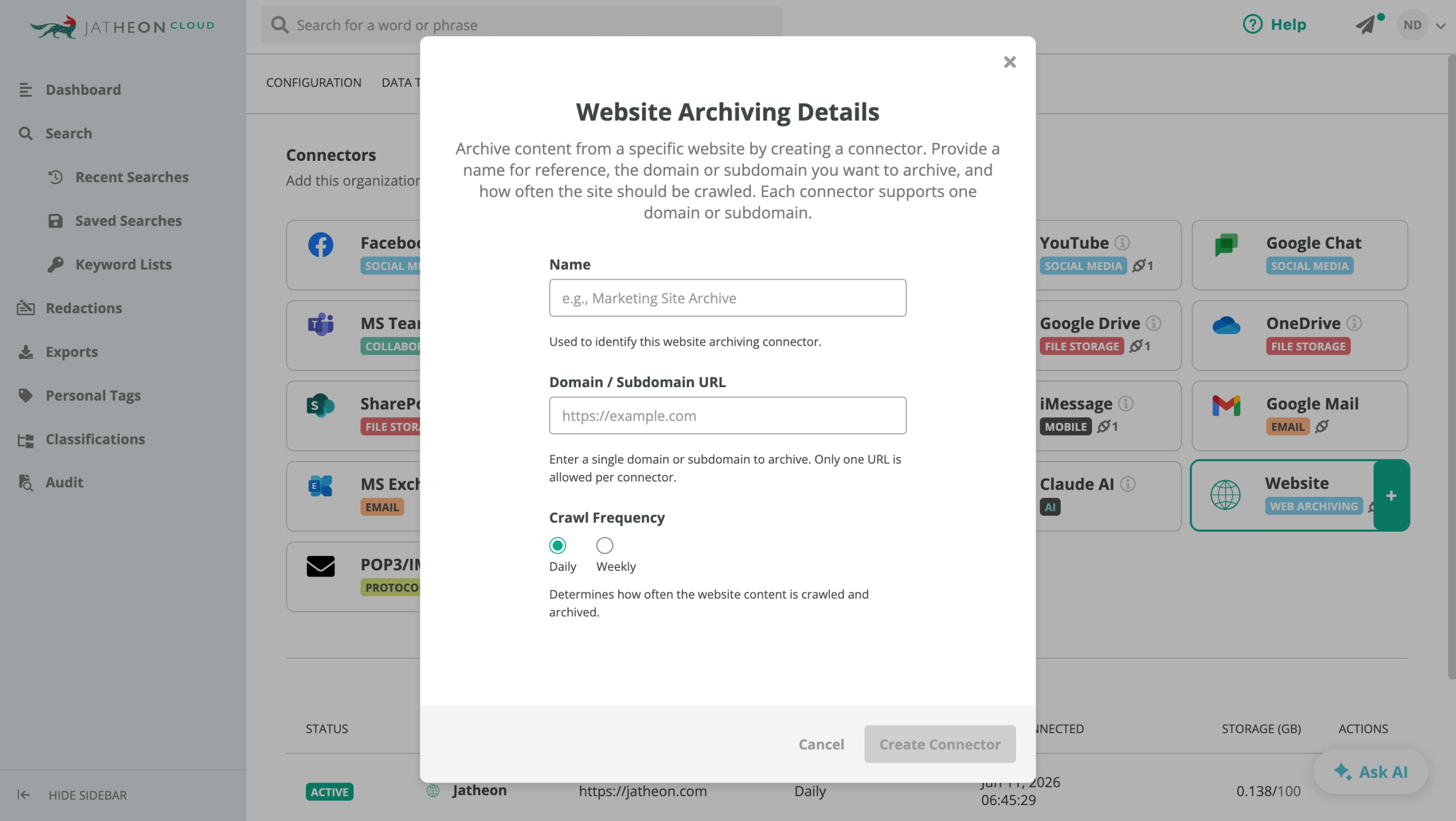
Click Create Connector. A success notification will confirm it was created, and the connector will appear in the Website Connectors table. From there, you can monitor each connector’s status (Active, Inactive or Disconnected), storage usage, crawl frequency and the date it was first activated.
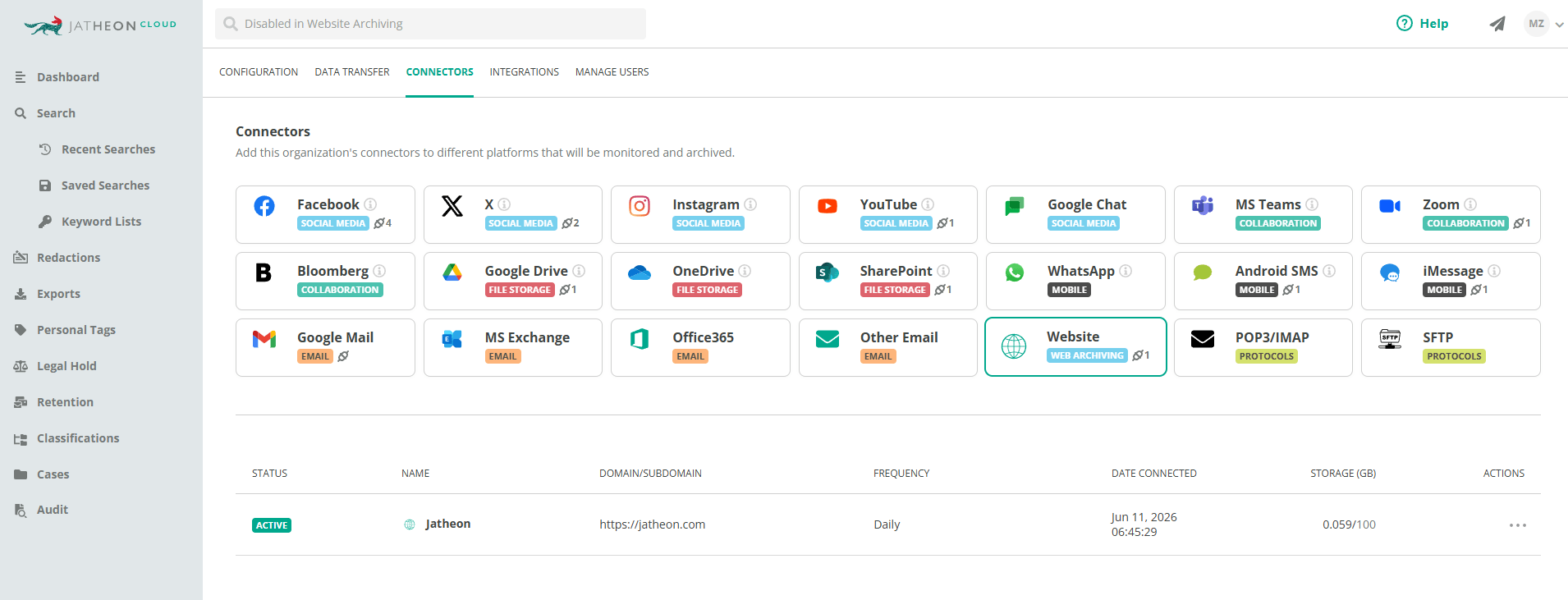
Start the first crawl
Creating the connector doesn’t start crawling automatically. To begin archiving, find your connector in the table, open the Actions menu and select Connect. A success notification will confirm the connection is live.
The first crawl results are available within 24 hours of connecting, regardless of your selected crawl frequency. Jatheon currently supports daily and weekly crawl frequencies, with monthly options planned for a future release.
For most regulated organizations, daily is the right default. Financial services firms with frequently updated disclosures, fee schedules or marketing materials will want content captured as close to real time as possible. Daily crawls give you a defensible record with minimal gaps.
What gets captured and how to search for it
Each crawl captures a full version of your website as it appeared at that point in time. In the platform’s search interface, results include:
- Page titles and URLs
- File types, including audio, video and application files
- Full page content
- Version history based on your crawl frequency
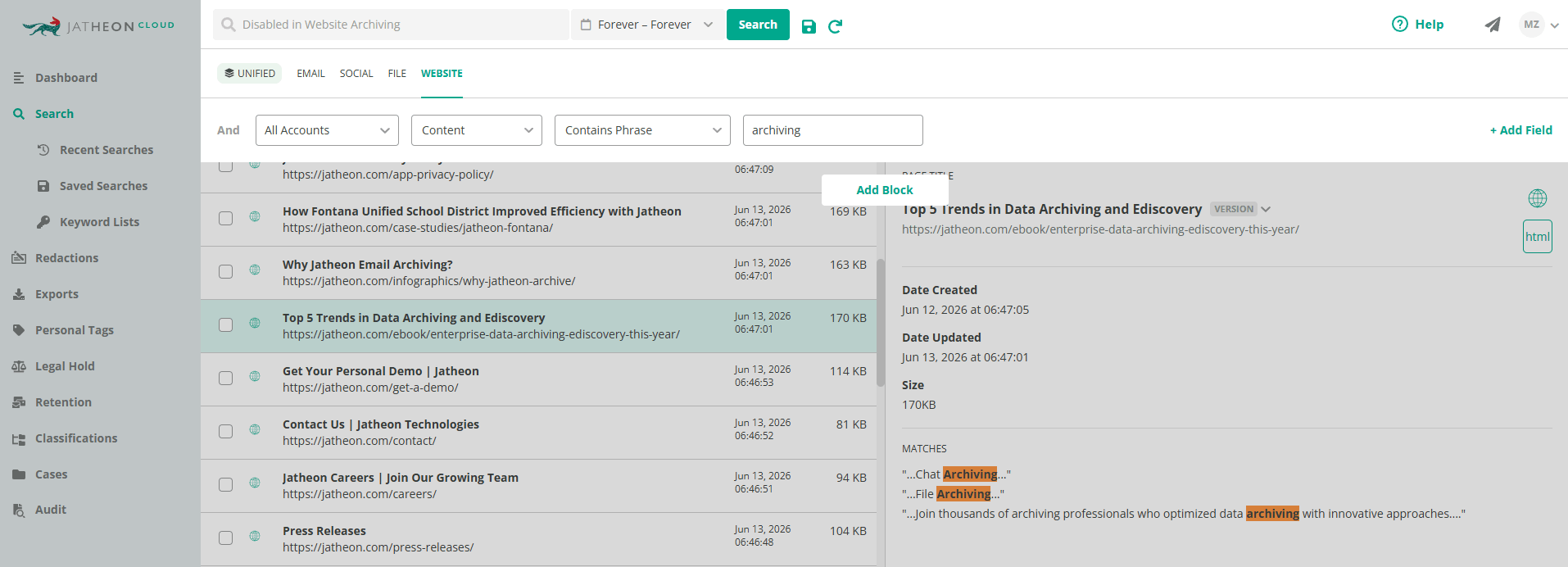
The platform maintains a version history of each crawl, so you can view your site exactly as it appeared on any given date.
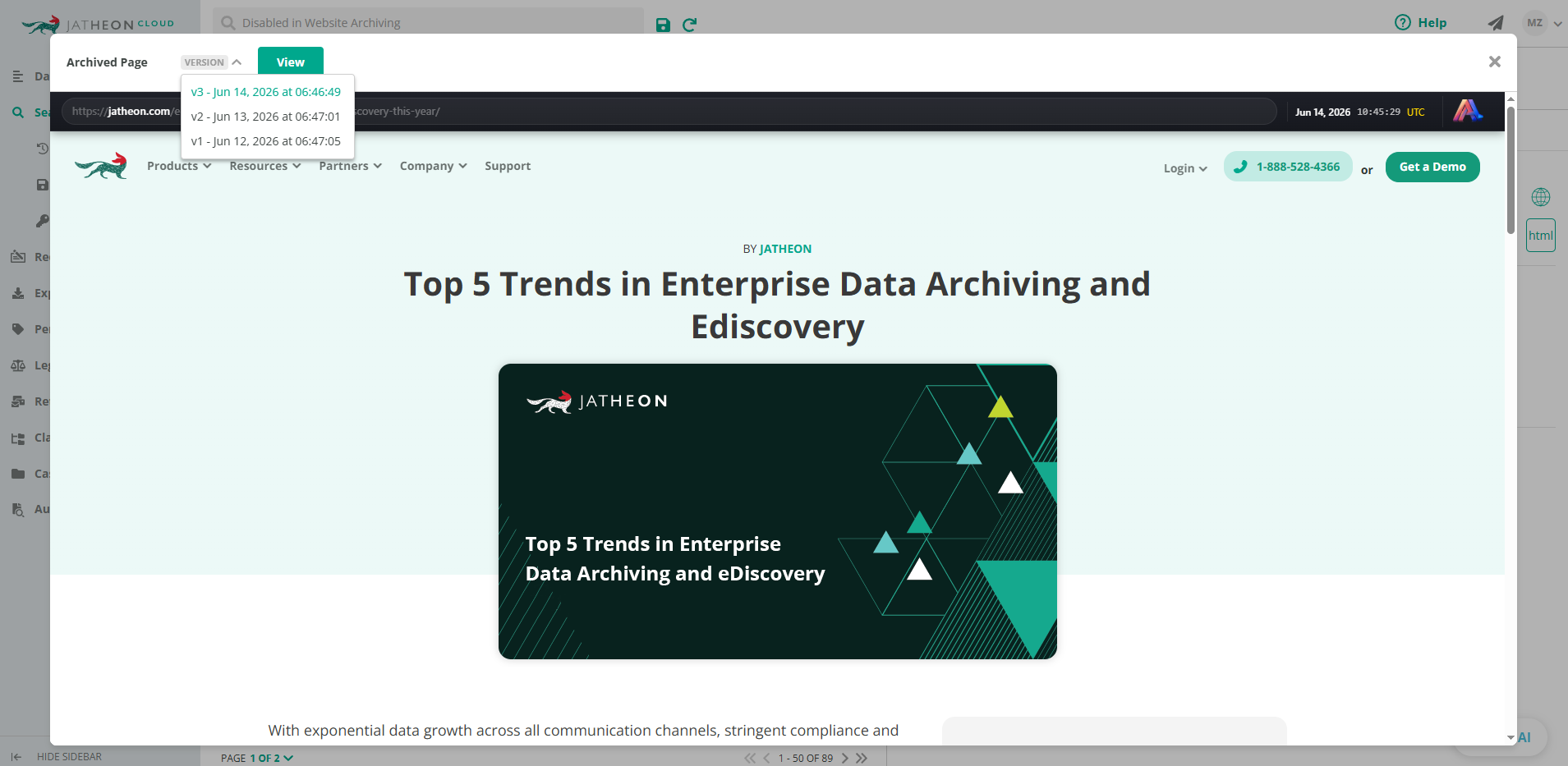
Standard platform actions apply to archived web content: you can apply tags, connect or disconnect content from a case, download specific versions and add notes using the same workflow you already use for email and chat.
For organizations that have already built out their archiving program in Jatheon Cloud, adding website capture means that when a regulator asks what your website said on a specific date, you’re running one search across all channels, not chasing records across multiple systems.
Conclusion
Website archiving has moved from a best practice to a compliance expectation and regulators are making that clear through enforcement.
The organizations that get caught out aren’t necessarily the ones with the worst compliance programs, but those that assumed their website didn’t need the same treatment as email, chat, and other channels.
FAQ
What types of website content need to be archived?
More than most organizations expect. Text, images, forms and downloadable files are the obvious ones, but compliant archiving also needs to capture JavaScript-rendered content, embedded videos, interactive elements, personalized pages and any third-party content your site links to or hosts. Under FINRA Regulatory Notice 17-18, a firm that links to third-party content effectively adopts it, which brings that content into scope. If a visitor could see it, a regulator can ask about it.
How often should a website be archived?
It depends on your regulatory requirements and how often your site changes. Financial services firms subject to SEC and FINRA rules should archive at a minimum daily, and ideally on every change. Government agencies handling FOIA-eligible content should follow the same principle. If your website updates frequently with new disclosures, pricing or marketing claims, more frequent archiving reduces the risk of gaps in your compliance record.
Can screenshots be used as compliant website archives?
Generally, no. Screenshots capture only what’s visible on screen at one moment. They miss dynamic content, interactive elements and personalized pages. They also lack tamper-proof verification, metadata and audit trails. A regulator can challenge whether a screenshot accurately represents what was published at a specific time. Compliant website archiving requires automated, timestamped captures stored in an immutable (WORM) format.
Does website archiving apply to subdomains and microsites?
Yes, and this is an area where organizations frequently underestimate their exposure. Subdomains and microsites are separate web properties with their own URLs, which means they won’t be captured unless you explicitly configure them for archiving. For regulated organizations, that’s a compliance gap. A microsite running a product campaign, a subdomain hosting investor disclosures, or a separate portal for customer-facing forms can all carry the same regulatory obligations as your main domain. Each one needs its own connector and crawl schedule.
How does website archiving hold up in litigation or a regulatory investigation?
That depends almost entirely on how the archive was created. Records produced from a compliant website archiving solution, one that captures content automatically, stores it in tamper-proof format, timestamps every capture and maintains a full audit trail, are generally defensible in litigation and acceptable to regulators. What gets challenged is records that can’t be verified: screenshots with no metadata, exports with gaps in coverage, or archives where the chain of custody is unclear. The standard regulators and courts apply is whether you can prove what was published, when it was captured and that the record hasn’t been altered since. A compliant archive answers all three.