
Key Takeaways
- iMessage archiving typically runs from $10 to $30 or more per user per month, but unlike email, the price you see rarely reflects the true cost because the capture method itself carries hidden operational and security overhead.
- The single biggest cost driver is not the subscription but the architecture behind the capture, since methods that depend on employees’ own AOR federated iCloud credentials.
- iMessage is fundamentally harder to archive than email or SMS because it is end-to-end encrypted, routes through Apple’s servers rather than the carrier network, and offers no native way to separate business from personal conversations.
- Blocking iMessage looks like the cheap option, but it pushes conversations onto unmonitored channels and leaves you exposed the moment an employee leaves or a device is recycled, which is exactly when regulators come looking.
- A connector-based model that captures business messages automatically, without touching personal iCloud logins and without a second device, gives you complete, reliable capture while keeping personal accounts out of scope, which protects your users. Jatheon delivers that architecture at the best value on the market.
Introduction
Regulators have made one thing clear over the past few years: a business-related conversation is a business record no matter which app it travels through.
Since 2021, regulators have penalized more than 100 firms over $3 billion combined for off-channel and recordkeeping failures, and a growing share of those cases involve text and iMessage threads that firms simply had no way to capture.
Email, web, social and file archiving are solved problems for most organizations, and the budgeting for it is reasonably well understood.
iMessage (and also WhatsApp) is a different story. It’s one of the most-used business messaging channels in the United States, particularly in financial services, and it’s also one of the hardest to archive correctly.
The result is that IT leaders who assume mobile message archiving will price out like email are almost always caught off guard, both by the sticker price and by the operational baggage that comes with certain capture methods.
If you’re still deciding whether mobile archiving belongs in your compliance program, it helps to first understand why business texts and iMessages count as records.
Here is what this article will help you understand:
- Why iMessage is technically harder to archive than email or SMS
- The capture methods on the market and the hidden costs baked into each
- How much iMessage archiving costs and how to calculate your total cost of ownership
- What non-compliance costs compared to archiving
- How to evaluate pricing models and avoid overpaying
Why iMessage Is Hard to Archive in the First Place
Before you can budget for iMessage archiving, you need to understand why it costs what it does, and that comes down to how Apple built the service. Three characteristics make iMessage uniquely difficult to capture for compliance.
End-to-end encryption
iMessages are end-to-end encrypted, and there is no official Apple compliance capture method. There is also no API.
Messages are secured between the sender and recipient. iCloud backups exist, if enabled (disabled by default for privacy, and individually accessed), but they offer neither guaranteed encryption nor a reliable, compliant way to produce records on demand.
Traditional archiving tools that were built for email or carrier SMS simply can’t read the content.
No carrier routing
iMessage doesn’t route through the mobile carrier. Where an SMS passes through Verizon or AT&T and can be captured at the network level, iMessage travels over Apple’s own servers using Wi-Fi or data.
That single architectural difference is why carrier-based capture, the cheap and reliable option for SMS, doesn’t work for the blue bubbles at all.
No business-personal separation
Finally, iMessage has no built-in separation between business and personal use.
Apple ties the service to a single Apple ID, and, unlike WhatsApp Business, there’s no native mechanism to label a message as work-related or to keep personal conversations out of the capture.
In a BYOD environment, this creates a genuine conflict: capture everything, and you sweep up an employee’s private life, or capture nothing, and you fail the audit.
These architectural realities are why iMessage archiving requires a specialized approach, and why so many vendors solve the problem in ways that quietly cost you more than the invoice suggests.
Capture Methods and Their Hidden Costs
The price of an iMessage archiving solution is inseparable from how it captures messages.
Each method on the market carries its own cost profile, and some of the most expensive costs never show up as a line item.
Carrier or network-level capture
Forcing messages to fall back to SMS lets the carrier record them before they reach the device.
It’s simple and reliable, but it strips iMessage of everything that makes it iMessage, including encryption, read receipts, and rich media like photos, push-to-talk, contact sharing, etc. Plus, it isn’t viable in a BYOD setting without employee consent.
For firms that prioritize compliance over user experience, it’s workable, but the trade-off is real employee friction and, often, quiet non-adoption.
Cloud-hosted capture
An instance in the cloud logs in a user’s Apple ID and lets Apple’s Continuity service sync messages and act as a passive recorder.
It captures native iMessage content, but it depends on the user’s personal Apple ID credentials, which is precisely the exposure that makes security teams nervous.
On-device agent capture
Enterprise software installed on the phone replaces the iMessage app and records messages in real time, which gives you rich capture. Apple’s APIs are restrictive, though, so the method usually requires MDM and a supervised device. It also significantly changes the user experience. Finally, it raises the same personal-versus-business privacy question in a BYOD environment.
Manual or iCloud-pull methods
Here, employees periodically export or upload their own message history. This method is the cheapest to license and the most expensive to operate, since it depends entirely on human diligence.
A missed upload is a gap in your record, and that’s exactly what an examiner finds.
The pattern across all of these is that the cheapest-looking option on paper is frequently the one that creates the most ongoing labor, the most privacy exposure, or the most audit risk.
The prospects we talk to have felt this directly.
Several evaluated iMessage capture vendors and walked away, not over price, but because the products relied on manual steps or exposed users in ways their security and privacy teams would not sign off on.
For these teams, the deciding factors were architecture and user exposure rather than pricing.
How Much Does iMessage Archiving Cost?
Published pricing for iMessage archiving is hard to find. Where it’s public, the range is wide.
Some platforms charge a flat per-user monthly fee. Others charge a base platform fee on top of a per-user rate.
On top of the archiving license itself, iMessage carries costs that email doesn’t:
- MDM licensing — Device-agent and supervised-device methods usually require a mobile device management platform, which typically runs $4 to $8 per user per month on its own.
- Storage — iMessage attachments, images, and voice notes are heavier than plain email text, and overage storage is often billed at around $800 (smaller vendors) – $2400 (Microsoft, Google) per GB per year once you exceed an included allocation.
- Legal hold and case fees — Some vendors charge per legal-hold case, sometimes starting around $500 each, which turns a routine litigation event into a variable expense.
The reason the range matters less than usual here is that two solutions at the same per-user rate can have wildly different true costs depending on the capture method.
A manual-upload product at a low monthly price can cost far more in staff time and audit risk than an automated one at a higher headline rate. The number to budget against is the total cost of ownership, not the subscription line.
Hidden Costs that Inflate Your iMessage Archiving Budget
The subscription is the starting point. Here’s where mobile-specific budgets tend to break.
Per-user pricing on departed employees
As with email, per-user models mean you keep paying for every mailbox or number ever provisioned, including people who have left.
With mobile, this compounds because reprovisioning and device turnover are constant.
MDM overhead
If your capture method needs device management, you’re absorbing both the MDM license and the internal labor to enroll, supervise, and maintain devices, particularly painful in a BYOD environment where employees resist enrollment.
Credential and security management
Methods that store personal Apple IDs carry a cost that never appears on an invoice: the security work of protecting those credentials and the liability if they’re ever exposed.
Manual review labor
Solutions that rely on employee uploads or that capture personal alongside business messages create review work for your compliance team, who then have to separate what matters from what does not.
Export and retrieval fees
Some vendors charge to extract your own archived messages, or to run and produce a search during an exam. These are rarely disclosed upfront and can rival a full year of subscription cost when you try to leave.
Storage growth
Rich media in iMessage means storage grows faster than text-only email, so any per-GB metering escalates more quickly than IT leaders expect.
Fragmented tooling
Running a standalone iMessage tool separate from your email, chat, and social archives means separate licenses, separate admin overhead, and separate search silos.
During an audit or ediscovery request, someone reconciles all of them by hand, which inflates both labor and legal review.
How to Calculate the TCO for iMessage Archiving
A complete TCO for iMessage archiving covers:
- The archiving subscription
- Any required MDM licensing
- Storage
- Internal labor
- Compliance risk
The labor component is far larger than it’s for email, and it varies enormously by capture method, so it deserves an honest estimate rather than a placeholder.
Consider a 500-person firm archiving iMessage over three years under two different approaches.
A manual approach often carries a modest subscription, say $6 per user per month, which comes to about $108,000 over three years.
The trouble is what sits underneath it. Device-agent methods usually require an MDM license at roughly $6 per user per month, another $108,000 across the same period, and rich-media storage that grows quickly adds a few thousand more.
The largest line, though, is labor: chasing uploads, separating personal messages from business ones, and remediating gaps before each audit realistically consumes half a full-time compliance hire, which, at an $80,000 salary, works out to roughly $120,000 over three years.
Add export and retrieval fees that surface during an exam, and the total lands near $350,000, with the subscription making up less than a third of it.
An automated, connector-based approach reverses that ratio.
The subscription may be higher, say $15 per user per month, or about $270,000 over three years, but there is no MDM to license, storage is predictable rather than metered, and the standing labor drops to a fraction of an FTE because nothing depends on manual uploads or credential management.
Add a one-time migration of around $10,000, and the total lands closer to $370,000, with the money going into capture rather than into overhead you can never fully staff for.
| Cost component | Manual / credential-based (3-year) | Automated connector-based (3-year) |
| Archiving subscription | $108,000 | $270,000 |
| MDM licensing | $108,000 | $0 |
| Storage (rich media) | ~$6,000, grows fast | Included |
| Internal review labor | ~$120,000 (0.5 FTE) | ~$24,000 (0.1 FTE) |
| Migration | Varies | $10,000 (one-time) |
| Export/retrieval fees | ~$8,000 | None with Jatheon |
| Total 3-year TCO | ~$350,000 | ~$304,000 |
Note: these are illustrative comparisons, not vendor quotes. Your actual costs depend on user count, device policy, capture method, and regulatory scope.
The real value is peace of mind: a fully automated collection system guarantees compliance and allows for easy search and retrieval when needed. Additional data governance and surveillance features could also come in handy for monitoring and actioning matches.
When you build the business case, present the TCO next to the cost of getting mobile archiving wrong, since framing the spend as risk mitigation rather than as an IT line item makes it far easier to approve.
And if you are already overpaying for a fragmented mobile tool with export fees, calculate the savings under a connector-based model where migration is a one-time expense and the savings recur every month afterward.
Jatheon migrates you off your existing setup, does not charge to get your data back out, and doesn’t lock you into a long-term contract, which turns the switch into a permanent cost reduction rather than a new form of lock-in.
The Cost of Not Archiving iMessage
Blocking iMessage seems like the free, safe choice, but it is really neither. It just pushes the risk out of sight rather than removing it.
Off-channel enforcement
The entire enforcement wave since 2021 has been about business conversations happening on channels firms never captured, and iMessage is one of the most common of them.
Archiving email and SMS while leaving iMessage untouched doesn’t make a record partially compliant. It leaves a gap, and that’s precisely what an examiner opens an investigation around.
Firms are increasingly expected to show they can capture every channel their people actually use, not just the ones that were easy to archive.
FINRA and SEC exposure
SEC Rule 17a-4 and FINRA rules require firms to retain business communications regardless of the channel, and iMessages that relate to client recommendations or investment decisions are records.
Individual settlements have reached as high as $200 million, the combined SEC and CFTC penalty against JPMorgan, whose staff conducted business over WhatsApp and personal texts.
The same rule applies to iMessage, which regulators have named directly as one of the channels driving the crackdown.
HIPAA and healthcare exposure
Where staff text patients or coordinate care over iMessage, those messages contain protected health information (PHI) that must be retained, and the inability to produce them is its own violation.
FOIA and public-records exposure
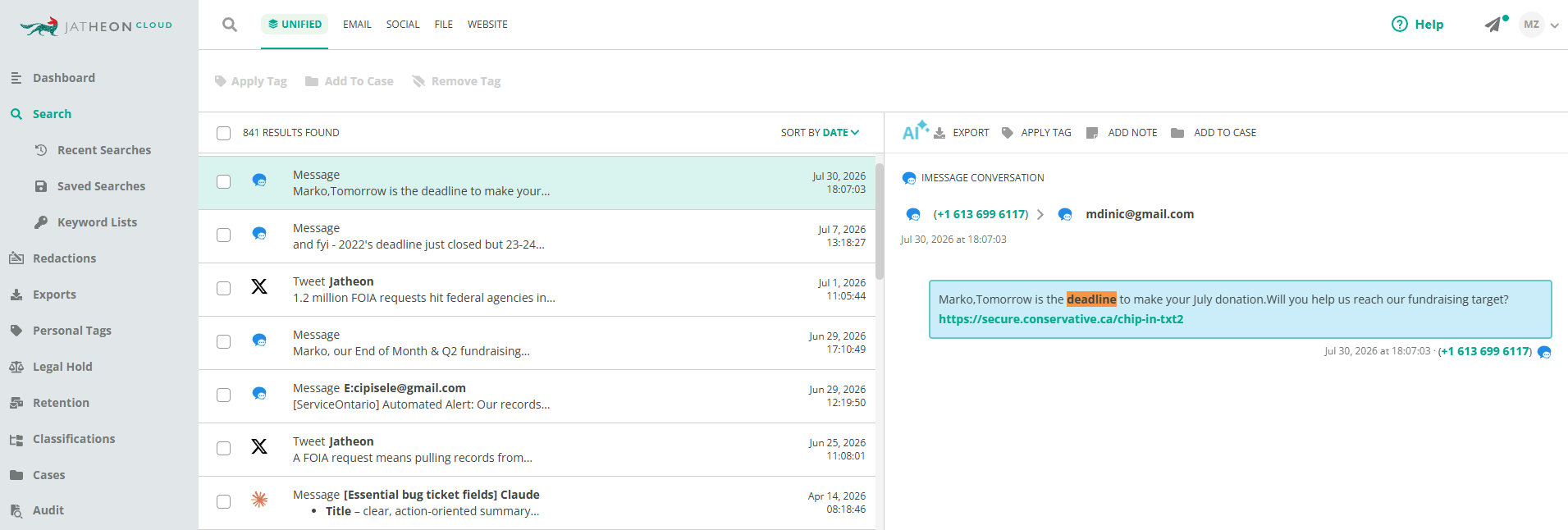
Government agencies whose staff use iMessage face public-records requests they can’t satisfy without a searchable archive, and state FOIA deadlines leave little room to reconstruct anything by hand.
Data loss at offboarding
This is the exposure that catches organizations by surprise.
When an employee leaves or a device is recycled, any business iMessages that were never archived are gone, and with them any hope of producing them in a later dispute or audit.
The blocking illusion
Prohibiting iMessage by policy doesn’t stop employees from using it.
It only ensures that when they do, the conversation happens somewhere you have no visibility, which is worse for iMessage compliance than allowing it under proper capture.
FINRA fined Deloitte Corporate Finance $200,000 in 2023 after exactly this went wrong: the firm had blocked iMessage on its corporate devices, the control silently broke, and roughly 676,000 messages went unarchived before anyone noticed.
The organizations we speak with that block iMessage today are consistently open to enabling it the moment a vendor can capture it cleanly, precisely because they know the prohibition is not actually protecting them.
Against risks of this scale, a properly priced iMessage archiving solution is a small fraction of a single enforcement action.
How to Evaluate iMessage Archiving Pricing Models
Not all pricing models protect your budget equally, and with iMessage, the capture method sits underneath the pricing model, so you have to evaluate both together.
- Per-user pricing is simple but punishes turnover, since you keep paying for departed employees, and mobile turnover tends to be higher than email.
- Per-GB pricing looks fine for a small archive but escalates quickly with iMessage because rich media inflates storage faster than text.
- Per-connector or per-active-user pricing ties your cost to currently active users and the channels you actually turn on, so your bill tracks your headcount rather than your data accumulation. For most organizations, this is the most predictable and budget-friendly model, and it is the one Jatheon uses.
- Flat-rate or appliance pricing offers predictable costs after an upfront investment and suits organizations that want full control over their data environment.
- Vendor lock-in fees can be cost-prohibitive. Some vendors charge up to 1.5x the annual subscription to let you copy your data off their platform. Make sure you understand your exit fees and, if possible, negotiate them up front and add them to the contract.
Before you sign anything, get direct answers to these questions:
- How exactly do you capture iMessage, and does it require an employee’s personal iCloud or Apple ID credentials?
- Is the capture fully automated, or does it depend on employees uploading their messages?
- Do you separate business from personal conversations, and how?
- Is MDM required, and is that cost included or separate?
- What happens to pricing when an employee leaves?
- Are there fees to export your data or to run a search during an audit?
- What does migration from our current setup cost, and are there export fees when we eventually leave?
The right vendor answers all of these plainly. If a vendor is vague about how it captures iMessage or dodges the credential question, that vagueness at the pricing stage is a reliable predictor of how the rest of the relationship will go.
How Jatheon Approaches iMessage Archiving
This is the point where the capture method stops being an abstract technical footnote and starts driving both your budget and your risk.
Jatheon captures business iMessages automatically. It does require a one-time user authentication to establish the handshake. Messages are routed by SMTP export into customer-controlled storage, which fits the ingestion model most IT teams already run rather than forcing a new one on them.
That design directly answers the objections we hear most often.
Employees have no manual upload step to forget, which keeps your records complete. And since the method never stores a personal credential, your attack surface stays where it is. Given that only business conversations are captured, you get the audit and compliance visibility you need over iMessage without disrupting how people actually work, and without pushing everyone onto Teams just to stay compliant.
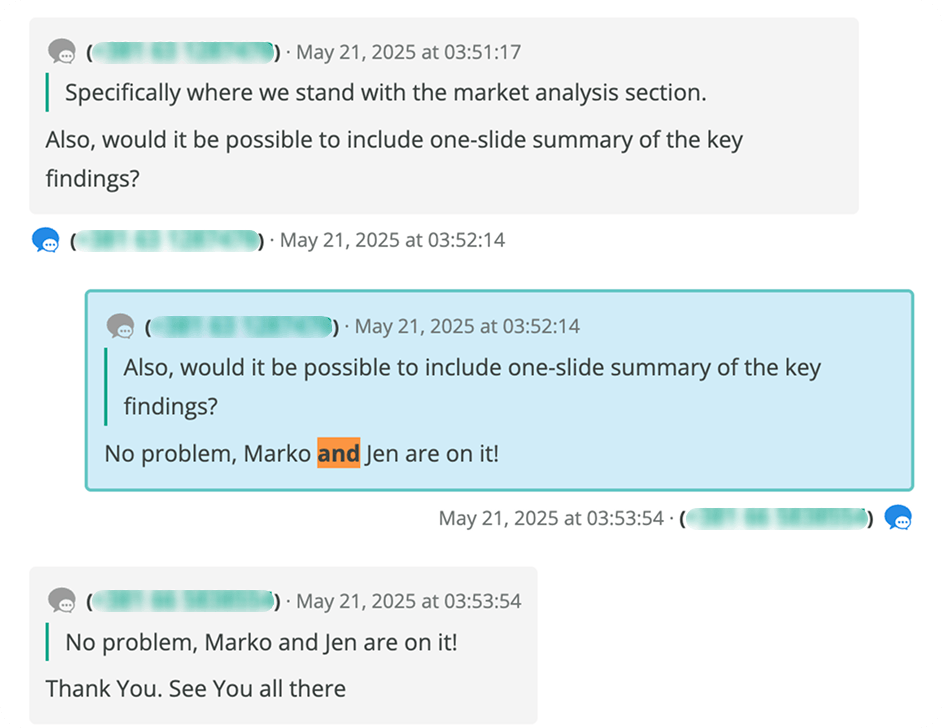
This method also allows you to capture metadata like edited and modified messages, attendance in channels, message quotes, and other user interactions as well.
It also fills a gap that even well-equipped organizations tend to have.
A typical compliance stack, Microsoft 365 with Intune for device management and Purview for email archiving, does a solid job on email and offers no answer at all for iMessage or WhatsApp between staff and customers.
That leaves audit exposure every time an employee departs or a device is recycled.
Jatheon closes that gap by bringing mobile messages under the same retention and search standards as everything else.
Because iMessage sits inside Jatheon’s wider multi-channel archive alongside email, SMS, WhatsApp, social media, collaboration tools, and website records, you license and search one system rather than stitching together a separate mobile point solution.
And on price, Jatheon has deliberately priced iMessage archiving to come in below the true cost of the alternatives, without the export fees, retrieval charges, and per-connector surprises that inflate what the competition actually charges.
Conclusion
iMessage archiving isn’t email archiving with a mobile label attached. The encryption, the Apple-server routing, and the lack of business-personal separation make it genuinely harder, and that difficulty is exactly what determines your real cost. The vendors that solve it cheaply on paper often do so by leaning on personal iCloud credentials, manual uploads, or device management overhead that shifts the cost onto your security team, your compliance reviewers, and your audit exposure rather than your invoice.
Build your budget around the total cost of ownership and the capture architecture underneath it, not the monthly rate, and weigh it against the enforcement and offboarding risk it removes.