
A Mimecast archive migration is mostly a question of how your history gets out of Mimecast: who runs the exports, what it costs, and how long you keep paying for Mimecast while it happens.
This guide covers the costs organizations report, a six-step plan, and how Jatheon moves a Mimecast cloud archive without an export bill or a gap in coverage.
The organizations we speak with tend to describe the same situation. The Mimecast renewal arrives, the price is higher, and the export quote to leave is higher still. Some sign another year only because the export cannot finish before the contract ends.
Four Ways to Export a Mimecast Archive
There are four realistic ways to get your history out of Mimecast. They differ in cost per terabyte, speed, and who does the work.
| Option | Cost per TB | Speed | Who does the work |
| Mimecast export | $10,000 to $20,000 | Scheduled by Mimecast, no faster than third-party firms | Mimecast, on its own schedule |
| Third-party export firm | $1,700 to $2,700 | About 1 to 5 TB per week | The export firm, with help from your IT team |
| Jatheon migration | About half the third-party rate | About 1 to 5 TB per week | Jatheon, after one sign-in |
| Manual export with Mimecast’s tools | No fee, but months of staff time | Months to years | Your own staff, export by export |
For a 4 TB archive, that is $40,000 to $80,000 through Mimecast, $6,800 to $10,800 through a third-party firm, about half of that with Jatheon, or months of your own staff’s time by hand.
Why Leaving the Mimecast Archive Is Expensive
Mimecast archives email well. Getting years of it out again is where the cost and the delay sit.
These are figures prospects shared with us from their own Mimecast and migration quotes:
- Export fees: Quotes between $10,000 and $16,000 per TB to export the archive.
- An 8 TB archive: One company was quoted $600,000 and nine months for 8 TB. After pushing back, the price dropped to $340,000, still for the same nine months.
- A 31 TB archive: A school district was quoted about 1 TB per week, or 31 weeks, plus a lead time of about 60 days before the export started.
- A 70 TB group: An organization with three Mimecast instances expected a three- to four-month export and had to renew for 12 months before it could leave.
The pattern is the same at every size: the export decides the timeline, and the timeline decides how much more you pay Mimecast.
How Jatheon Migrates Your Mimecast Archive
Jatheon migrates the Mimecast archive into your Jatheon cloud archive without a Mimecast export bill. Your administrator creates an export-only Mimecast account, signs in once, and chooses the date range. Nothing needs to be installed on your side.
- No Mimecast export fees: You pay Mimecast nothing for the export, and the Jatheon migration costs about half the third-party rate.
- Never hits Mimecast’s export limits: Exports are sized to fit the portal’s limits, so nothing is rejected, truncated, or left behind.
- Counted against Mimecast: Every export is checked against Mimecast’s own count before it is delivered. If the numbers don’t match, you see it.
- Recovers on its own: Failed exports and downloads are retried automatically. Your administrator is emailed only if Mimecast asks for a new sign-in.
- You stay in control: Pause, resume, or stop at any time. Anything already delivered stays in your archive.
- Legal hold items included: Messages under legal hold in Mimecast are exported with the rest of the archive.
- No gap in coverage: Live archiving into Jatheon starts first, so new email is captured from day one while the history moves.
A mortgage lender with about 600 users, had archived its email in Mimecast for 10 to 15 years. With a Mimecast renewal approaching, it moved email and Microsoft Teams archiving to Jatheon and migrated its Mimecast history at the same time.
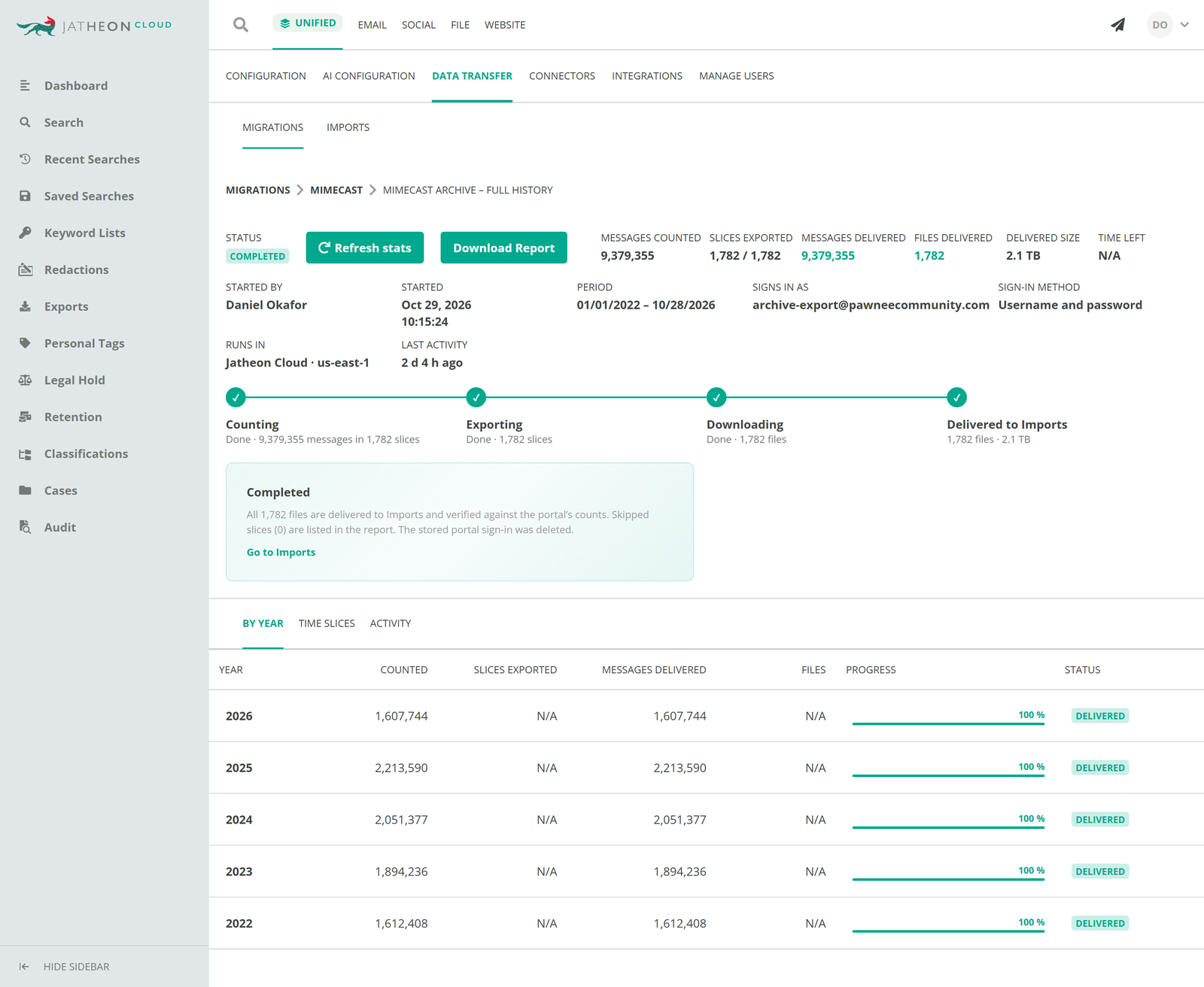
Track every migration in the Data Transfer dashboard
Migrations start from a Mimecast tile under Data Transfer > Migrations. A short wizard connects the account, sets the date range and scope, and asks you to review before anything starts.
After that, the migration page shows its status, messages delivered against the Mimecast count, and a report for each import, including how many documents were imported and any that were not, with the reason.
A Six-Step Mimecast Archive Migration Plan
Start these steps at least 3–4 months before your Mimecast renewal date.
- Check your contract dates: Note when the Mimecast subscription ends and what access you keep afterward. Get any extension terms in writing rather than relying on informal grace periods.
- Size the archive: Record total terabytes, the number of mailboxes (including former employees), the oldest message date, and whether you run more than one Mimecast account.
- List retention and hold obligations: Write down retention periods and every open legal hold or records request, so nothing under hold is deleted during the move.
- Book a technical review: A one-hour session with Jatheon confirms the route for your environment and fixes the price before you commit.
- Start live archiving first: Point journaling at Jatheon so new email is archived from day one.
- Migrate, reconcile, then switch off: Let the historical migration run, check the counts and the import reports, file them with your records, and only then let the Mimecast contract end.
How to Keep Records Defensible During the Move
A migration is a transfer of regulated records, so it needs the same evidence as any other recordkeeping process.
- Keep proof of completeness: Save the counts and import reports. They show that each period arrived in full, or exactly what did not and why.
- Meet the storage rules in the new archive: Since the SEC’s 2022 amendments to Rule 17a-4, broker-dealers can use WORM storage or an audit-trail system, and must be able to produce records in a usable electronic format. FINRA Rule 4511 sets a 6-year default retention where no other period applies, which covers most of what sits in a Mimecast archive. Jatheon supports SEC 17a-4 compliance with WORM-compliant storage and a full audit trail.
- Keep search available: Records requests don’t stop for a migration. Migrated email lands in the same archive as new mail, so one ediscovery search covers both, and public agencies can answer open records requests without searching two systems.
What It Costs to Leave Mimecast with Jatheon
- Migration priced up front: One quote covers the move, fixed after the technical review.
- Inactive mailboxes are free: Former employees’ history is migrated and kept at no extra charge. You pay for active users.
- No overlap you don’t need: Because the migration doesn’t wait in an export queue, you aren’t forced into a long renewal just to finish the export.
- No exit fees: If you ever leave Jatheon, you take your data with you without paying an export fee to us.
- Terms that fit: One-, three-, and five-year agreements are available.
Questions to Ask Before Your Mimecast Archive Migration
Ask Mimecast
- What does it cost per terabyte to export our archive, and how long will it take?
- How long do we keep access to the archive after the contract ends, in writing?
- Is a short renewal available while we migrate?
Ask Jatheon (or any new vendor)
- Who runs the Mimecast exports, and what do you need from us?
- How do you prove every message arrived?
- What happens when an export fails?
- Do you charge for inactive mailboxes or historical storage?
- Will we have any gap in archiving during the move?