

A public records request rarely asks for one thing. It names people, their nicknames and initials, a project, and a date range, and the responsive records sit in email, text messages, WhatsApp chats, and social media comments.
Many agencies run these requests through Microsoft Purview eDiscovery, where a wildcard only works at the end of a word, so *smith or sm*th won’t run, or through Google Vault, where wildcards work only in Gmail and Groups and a query with a date operator is capped at fewer than 10 OR terms. For this reason, one request turns into a string of partial searches, with the results merged by hand, when what the agency needs is one complete, defensible set of responsive records.
The response clock keeps running during that merge. In California, an agency has 10 days to determine if it holds disclosable records, extendable by no more than 14 days. Federal agencies get 20 working days under the FOIA.
Jatheon Cloud handles this kind of request from one search screen: exact phrases, spelling variants, typos, words near each other, and text inside scanned attachments, across email, SMS, WhatsApp, social media, websites, and files, with the search criteria recorded.
Below, we follow a county records officer through one complex request to show how each search type helps and where its limits are.
Who this is for: Public records officers, city clerks, and records managers at state and local agencies, K-12 districts, and public universities who answer open records requests against a variety of communication channels. It also fits IT staff who search on behalf of a clerk’s office.
The Request on the Records Officer’s Desk
The request below is illustrative, but each part of it shows up regularly in open records work. It lands with a county records officer we’ll call Dana:
All emails, text messages, WhatsApp messages, and social media posts or comments between Commissioner James Doherty (also known as “Jim” or “JD”) and anyone at Oakridge Development, or mentioning the Riverside Park lease or #RiversidePark, from Jan. 1, 2025, to the present.
It reads like one question, but it hides several search problems. The table below maps each one to the part of Jatheon Cloud that handles it, and the rest of the article follows Dana through them in order.
| Part of the request | Why it’s hard to search | How Jatheon Cloud handles it |
| Jan. 1, 2025, to the present | A default date range quietly cuts results short | Custom From and To dates |
| “Oakridge,” “Oak Ridge,” and typos | Spelling variants and misspellings slip past exact terms | Fuzzy Search, wildcards, and keyword lists |
| “Riverside Park lease” | Staff rarely write the phrase the same way twice | Proximity Search |
| “Jim,” “JD,” and other names | Initials fall under the three-character minimum for typed terms | Keyword lists |
| #RiversidePark | Hashtags carry special characters | Special characters act as separators |
| Texts, WhatsApp, and social media | Each channel usually lives in a different system | Channel tabs and Unified Search |
| A scanned, signed lease amendment | The text exists only as an image | OCR on attachments |
A First Pass to Size the Request
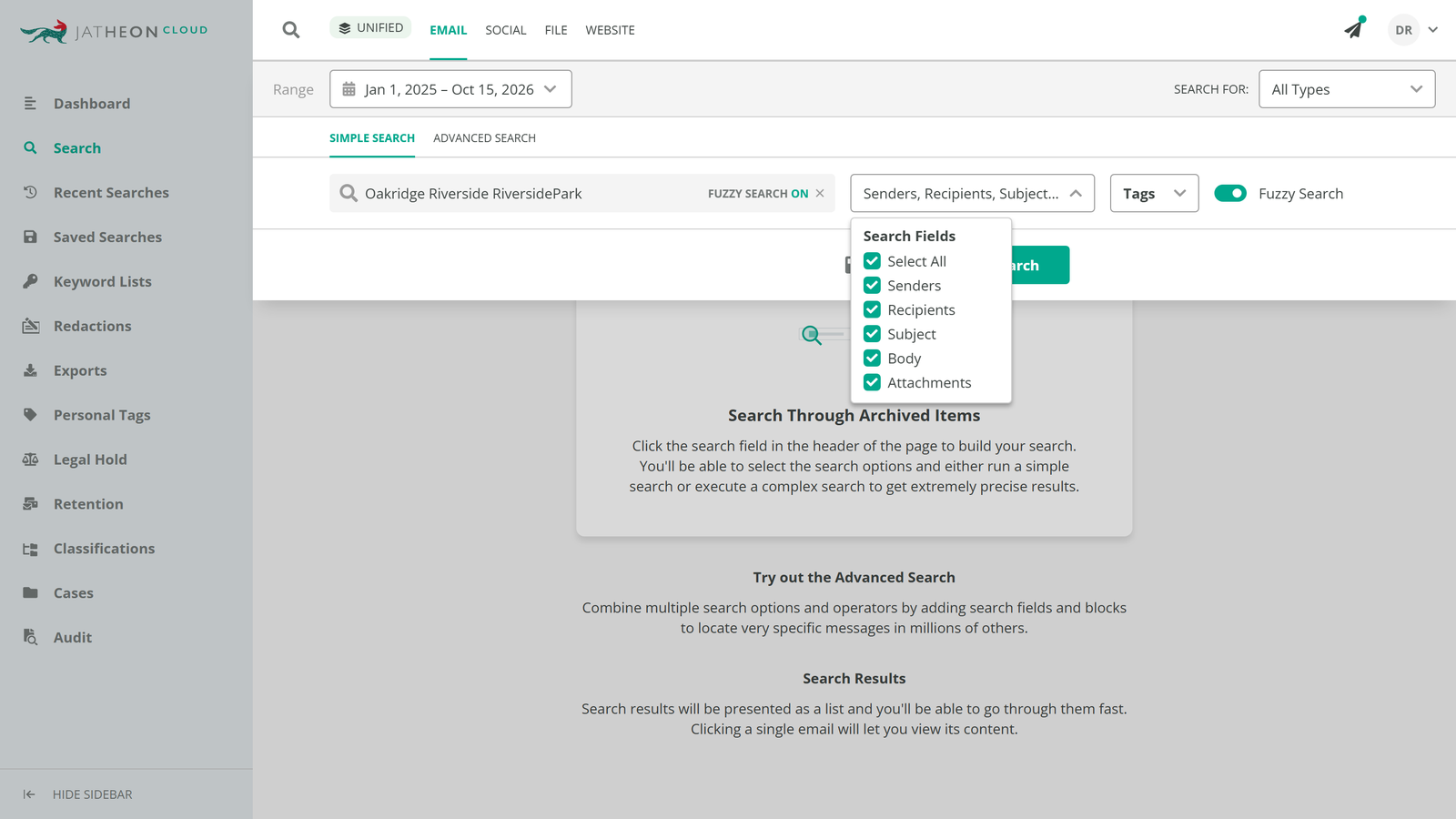
Dana starts with a quick look at how much material is out there. Simple Search takes a few terms, matches any of them (Contains Any), and searches every field by default. It sits in the Search section alongside Advanced Search, advanced social search, and Unified Search, each a separate permission; Compliance Officers and Account Admins typically hold all four.
The date range matters before anything else. Simple Search defaults to the last 14 days, so a request reaching back to January 2025 needs custom From and To dates, or the first count is missing more than a year and a half of records.
Dana types Oakridge, Riverside, and RiversidePark. Typed terms need at least three characters, and punctuation and special characters such as # and $ act as separators, so the search also catches the #RiversidePark hashtag. Because residents and staff spell the developer’s name a few ways, Dana switches on Fuzzy Search, which is off by default. Words of three to five characters can differ by one letter and longer words by two, so “Oakrige” still matches. Each term expands to at most 50 variants, and fuzzy matches are highlighted in orange so they’re easy to check.
The result count tells Dana how big the job is. It isn’t the final answer, though: Simple Search treats every term as an alternative, so it can’t express “Doherty and Oakridge” or “the lease, but not the park’s event schedule.”
Building One Query Instead of Ten
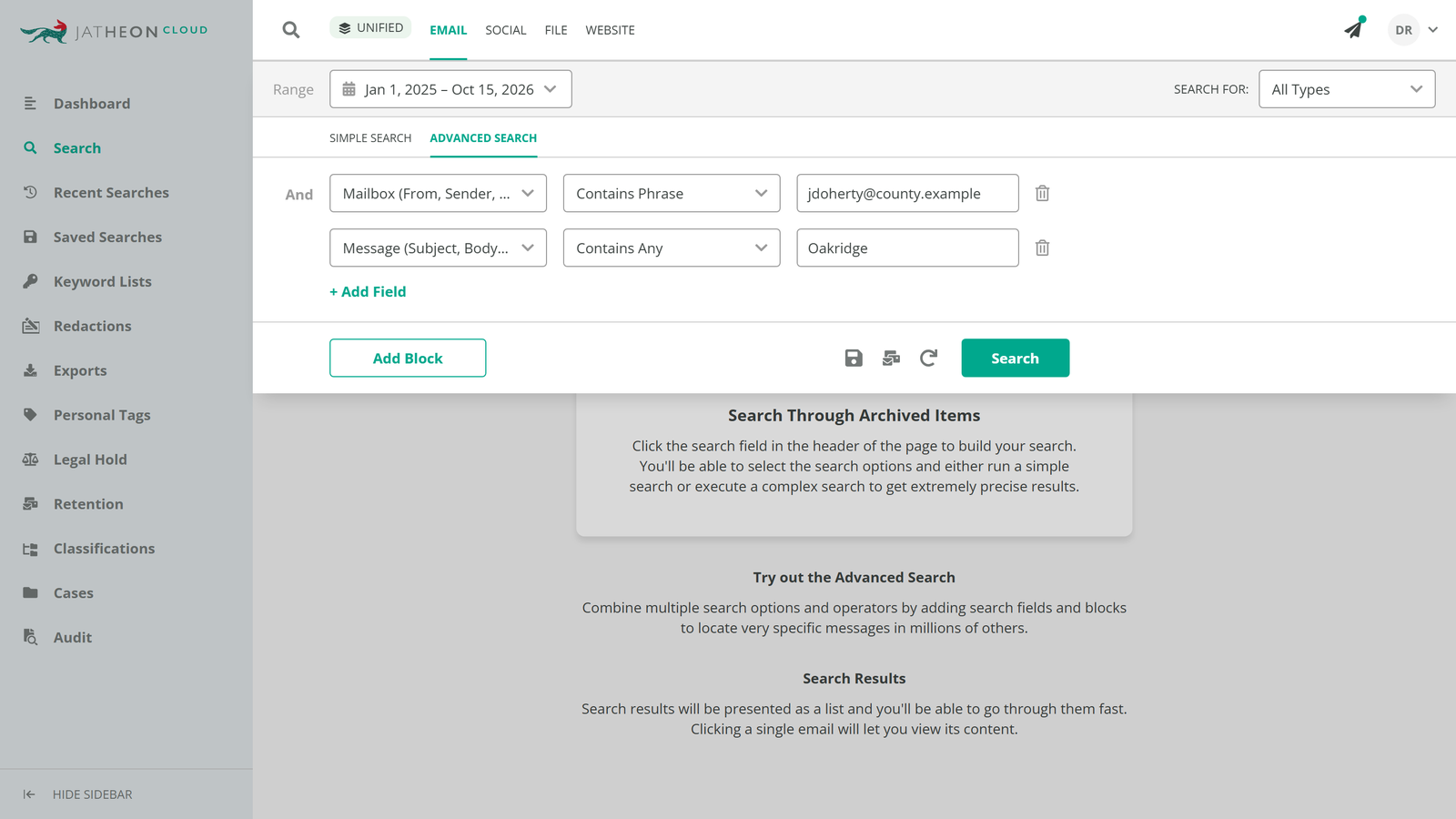
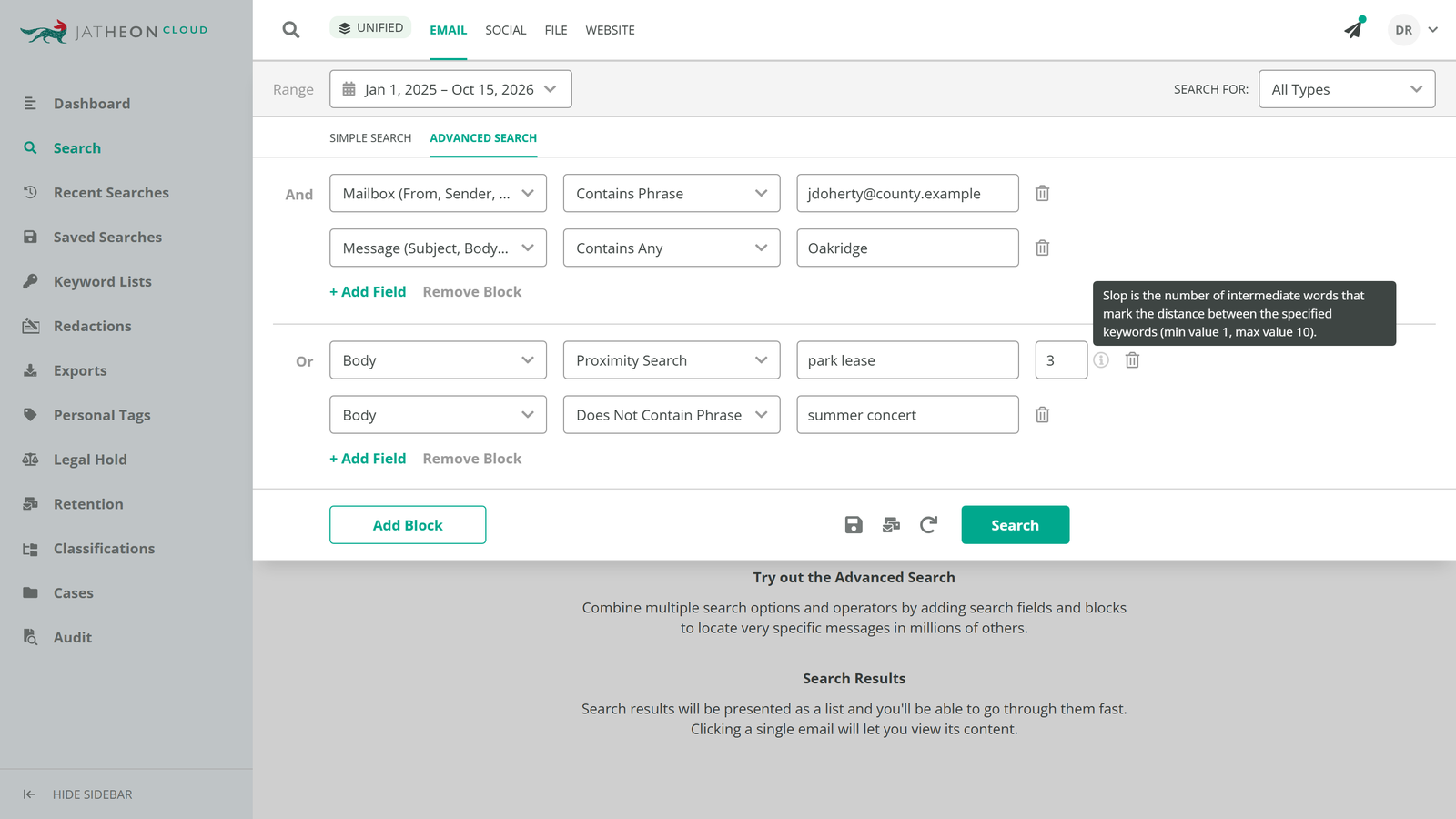
In Advanced Search, Dana writes the whole request as a single query. Conditions sit in blocks: conditions inside a block are joined by AND, and separate blocks are joined by OR. Each condition has a field (From, Recipients, Subject, Body, Message, Direction, and others), a predicate (Contains All, Contains Any, Contains Phrase), and a value.
The request has two halves, so the query gets two blocks:
- Block 1, communications with the developer: Doherty’s address in From or Recipients, AND Oakridge in the message.
- Block 2, the lease itself: the park and the lease mentioned close together, AND no mention of the summer concert series, which shares the park’s name and floods the results.
A few predicates do the precise work. Contains Phrase matches words in the exact order typed, which is also the reliable way to search an email address such as Doherty’s. Negative predicates such as Does Not Contain Phrase handle the exclusion.
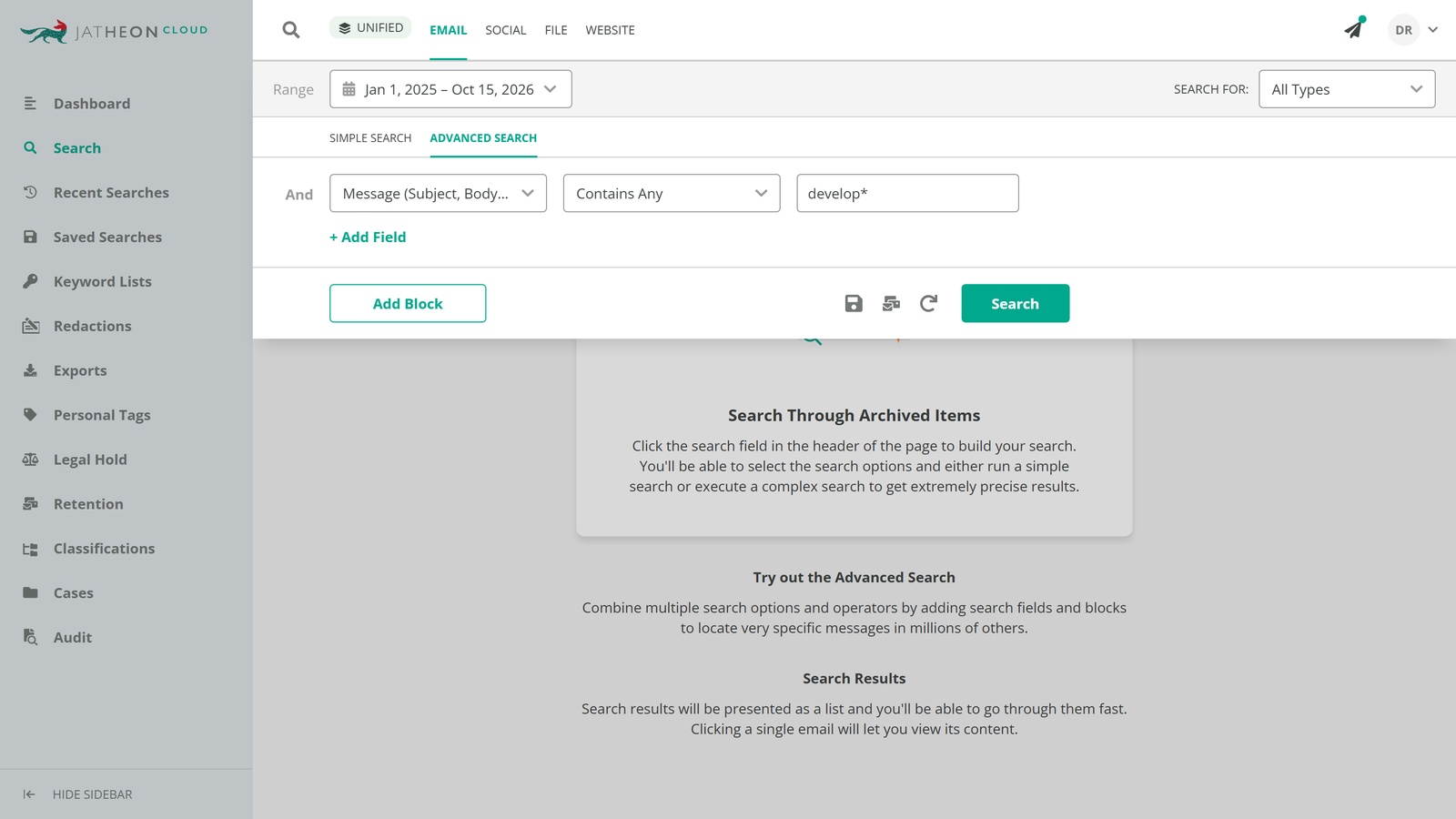
Wildcards catch word forms: ? replaces one character and * replaces any number, so develop* finds “develop,” “developer,” and “development.” They work in Simple and Advanced Search. When Fuzzy Search is on it takes priority over wildcards, so Dana switches it off for conditions where the wildcard pattern should decide.
Proximity Search handles the phrase nobody writes the same way twice. It finds two or more words within a set distance, called the slop, which runs from 1 to 10 intermediate words. A slop of 3 on “park lease” catches “lease for the park” without pulling every message that mentions either word.
Names, Nicknames, and Initials in a Keyword List
The request names Doherty three ways, and a records officer who knows the county will add a few more: “Commissioner Doherty,” the developer’s staff, and the “Oak Ridge” spelling that appears in older correspondence. Typing each one as its own condition gets unwieldy fast, and on a request naming 30 people and projects it stops being practical.
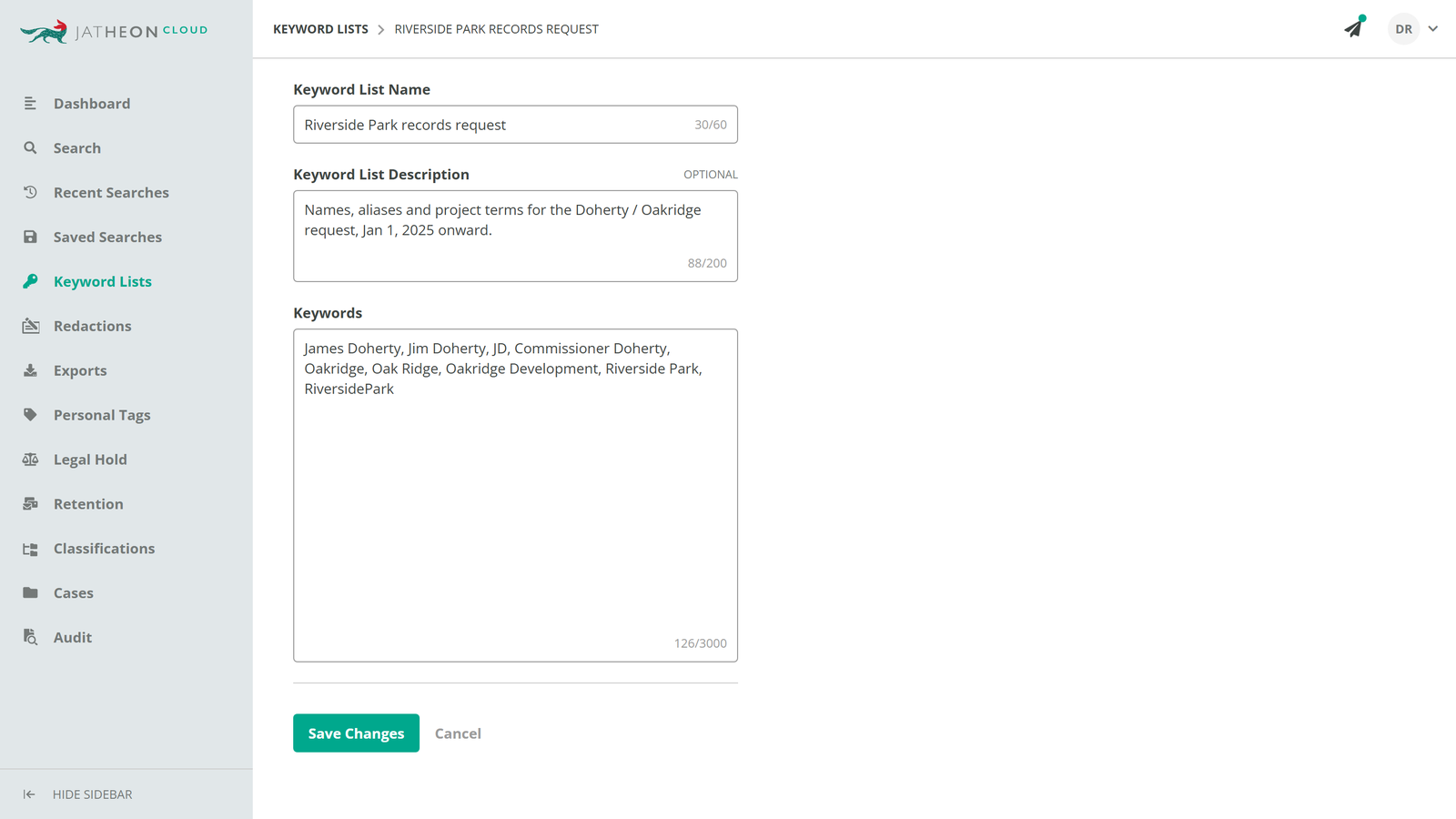
A keyword list holds them all in one place. Dana creates a list in the Keyword Lists section with comma-separated entries, up to 3,000 characters, and then points an Advanced Search condition at it with Contains Keywords from Keyword List (or Does Not Contain Keywords from Keyword List). On the Attachment field, Filename Contains Keywords from Keyword List matches file names, which picks up a document saved as “Oakridge_lease_draft.”
Two behaviors shape how the list is written:
- Each entry is searched as a phrase: “Oak Ridge” matches those two words together, not a message that has “Oak” and “Ridge” in different sentences.
- Entries don’t carry the three-character minimum: this is how Dana searches “JD,” which a typed search would reject.
Apostrophes and slashes don’t belong in list entries: An apostrophe acts as a separator, and a slash returns zero results, so “Riverside/Oakridge” needs to become two entries. Dana can also attach the list to a case and reuse it later for redaction terms.
Texts, Social Media Comments, and a Scanned Lease
Part of the request lives outside email. Doherty texts the developer from a county phone, and residents argue about the lease under #RiversidePark on the county’s social media pages.
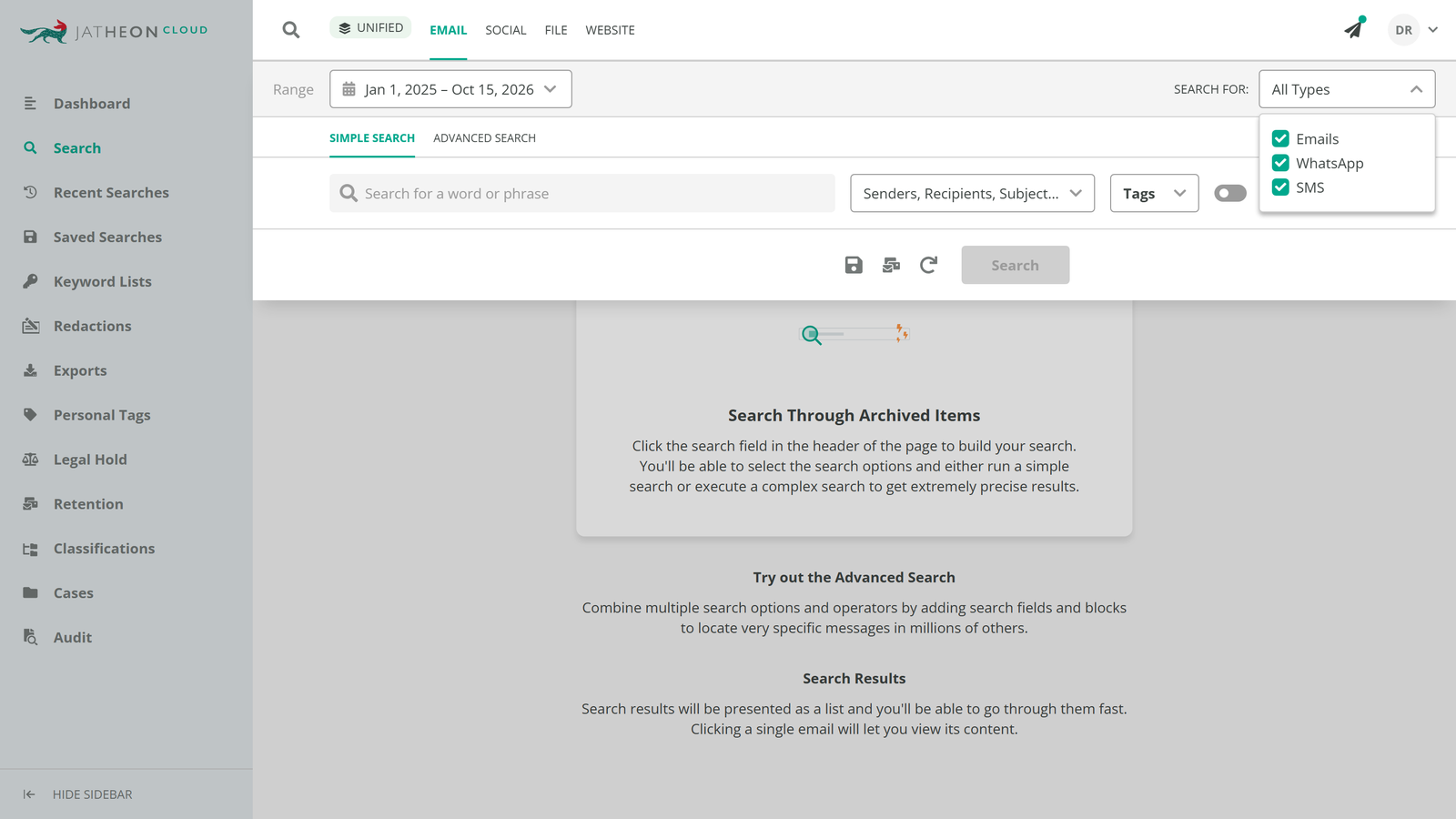
Tabs across the Search section set the channel: Email, Social, File, Website, and Unified, which searches all four at once. On the Email tab, the Search for dropdown switches between Emails, SMS, and WhatsApp. In SMS or WhatsApp mode the fields relabel to Participant (From, To) and Message (Body, Attachment), so the same keyword list and proximity condition carry over to Doherty’s texts. On the Social tab, search reads the content of textual attachments on social media items, not only their names.
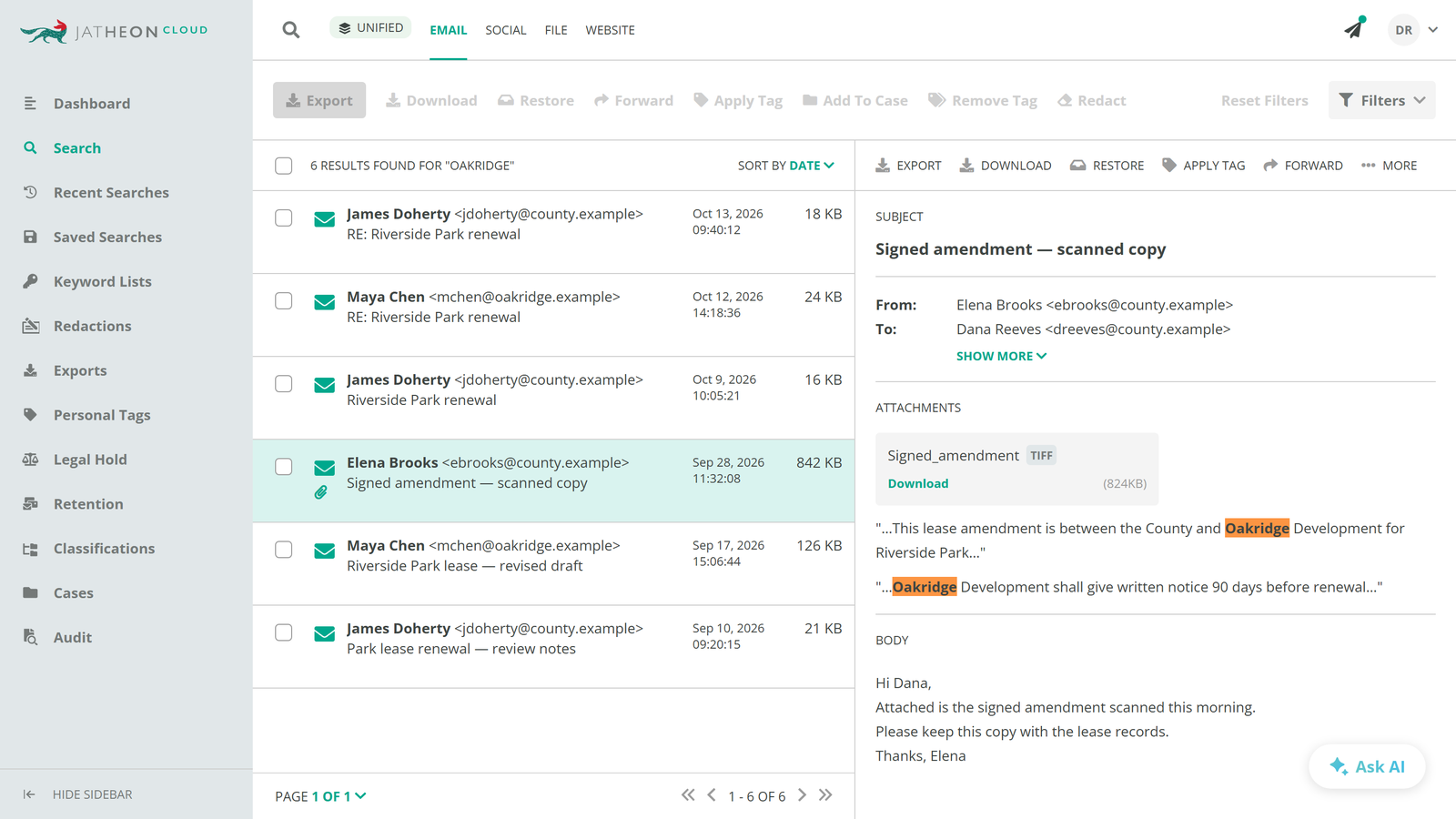
Then there’s the signed lease amendment, which a staff member scanned and emailed as a TIFF image. The Message (Subject, Body, Attachment) field searches file names and the text inside attachments, including files inside ZIP archives. OCR* extracts text from PNG, JPEG, TIFF, JPEG 2000, GIF, WebP, and BMP files and from image-based emails, so the scanned amendment turns up for “Oakridge” the same way a typed memo would.
*A Jatheon administrator needs to turn on OCR under the AI configuration for this to work.
When attachments crowd the results, the Content Type Is and Content Type Is Not predicates filter them by Text, Image, Audio, Video, Application, or Other. Dana uses Content Type Is Not to drop the video clips attached to park event posts.
Turning Thousands of Hits Into a Responsive Set
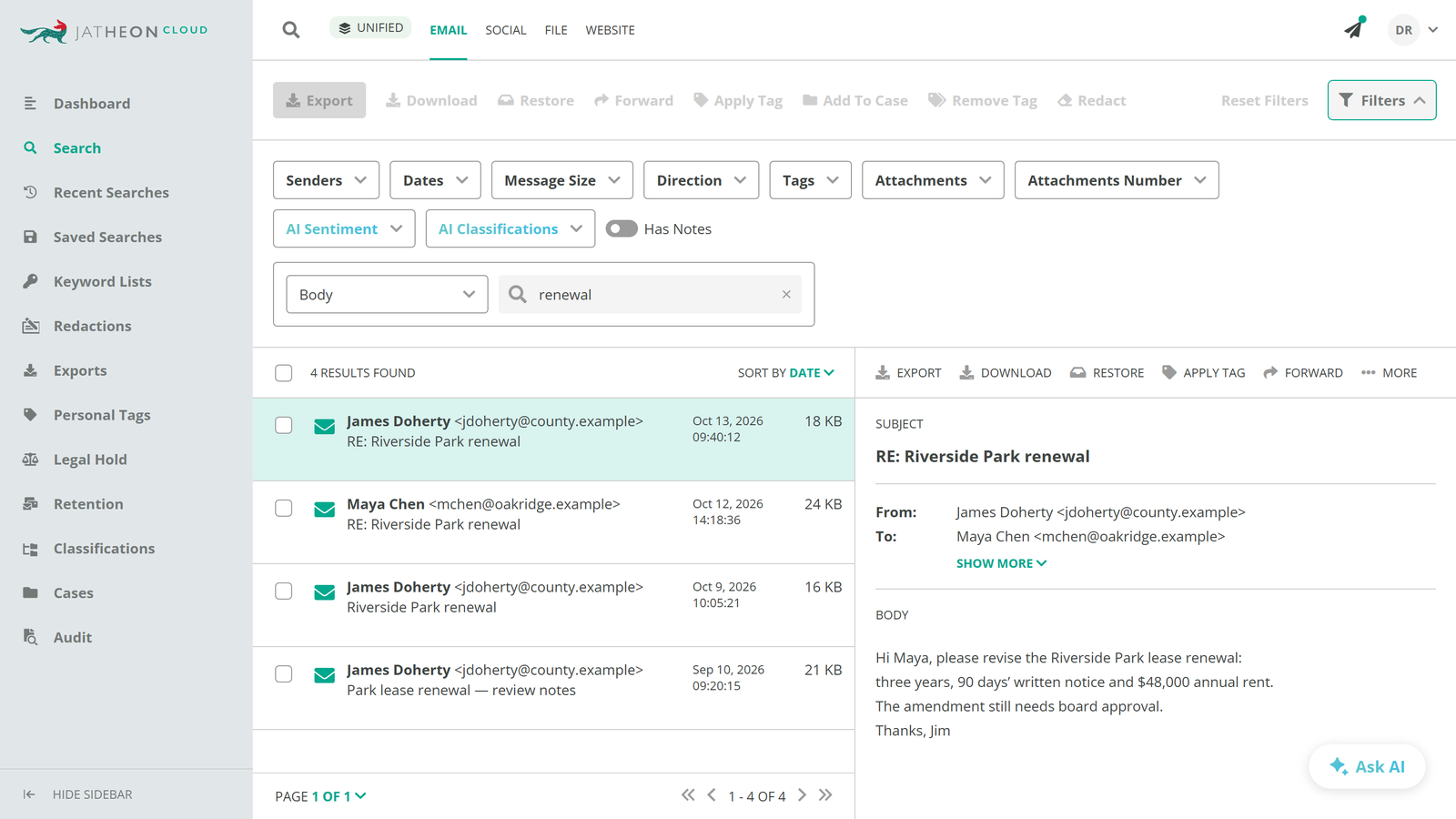
A 20-month request across several channels returns more than anyone can read item by item. Filters on the results page narrow it by Sender, Dates, Message Size, Email Direction, Tags, Attachments, Attachments Number, and Has Notes. Selected filters combine with AND, and several values within one filter combine with OR, so Dana can keep only items from Doherty’s two accounts that also carry attachments.
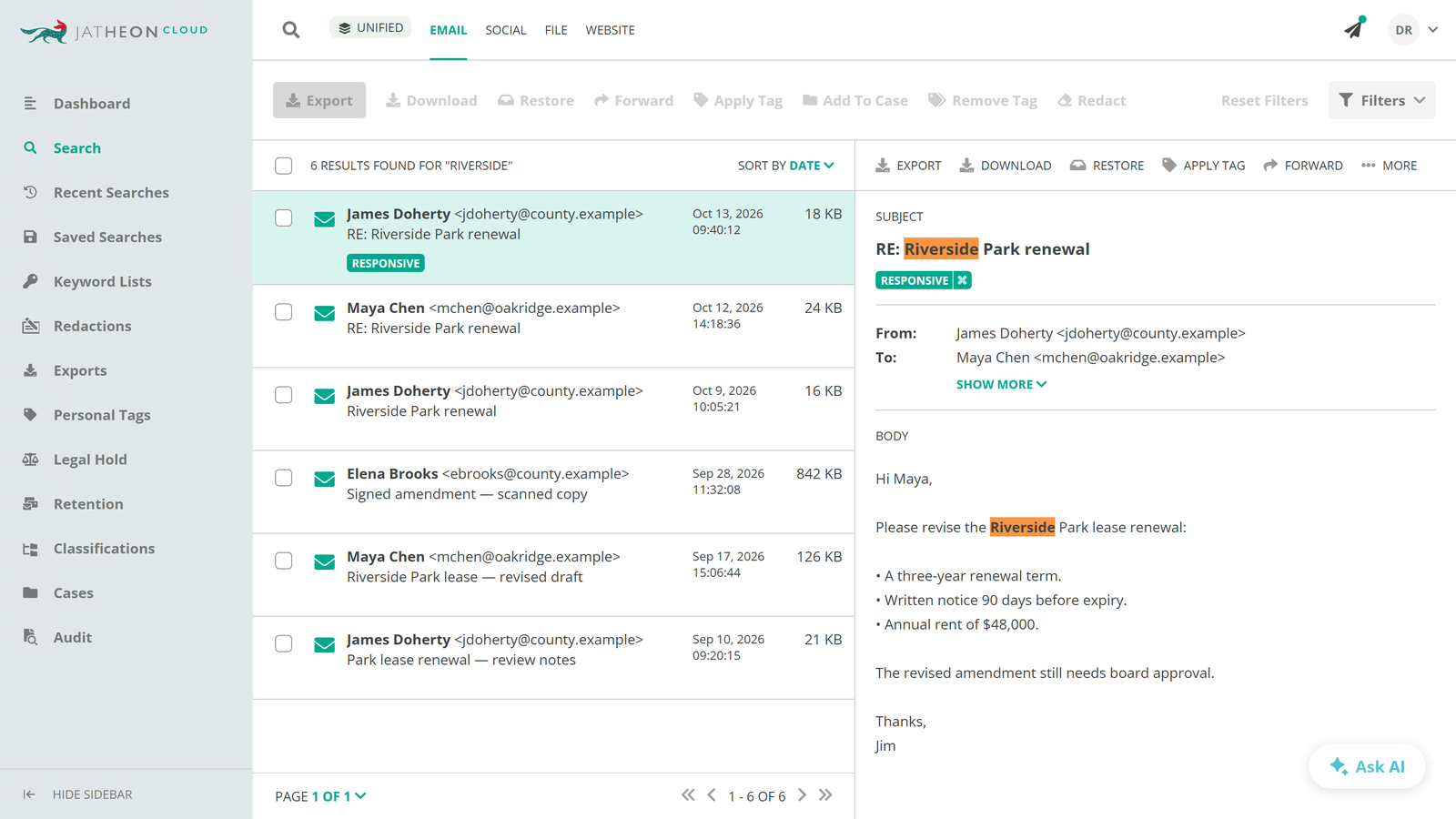
Subsearch then runs a second term against Senders, Recipients, Subject, Body, or Attachments, within the current results only. A subsearch for “renewal” on Body shows which of the lease messages discuss the renewal terms, without rebuilding the main query or losing the result set.
Completing the Review Without AI
Keyword search, filters, and subsearch get Dana to a set she can read, and from there the review can be done entirely by hand. For many requests, that’s the whole job.
Dana opens each item in the single email view. Fuzzy matches are highlighted in orange, and terms found in scanned attachments are highlighted in the extracted text, so she can see why an item matched before reading it in full. She tags the items that answer the request and adds notes on borderline calls, such as a text that mentions the lease only in passing. Because Tags and Has Notes are also filters on the results page, she can later pull up only the responsive set, or only the items with notes, when a supervisor checks her decisions.
The same keyword list that found Doherty’s nicknames is attached to the case, so it carries over to redaction. When the requester narrows the date range or adds a name, Dana updates the saved search and re-runs it instead of starting over.
The limit is reading time. Keywords show that a message mentions the lease, but deciding whether it discusses the renewal terms still means opening it. On a request that returns a large set, that reading takes up most of the response window.
Enhancing Keyword Search with AI
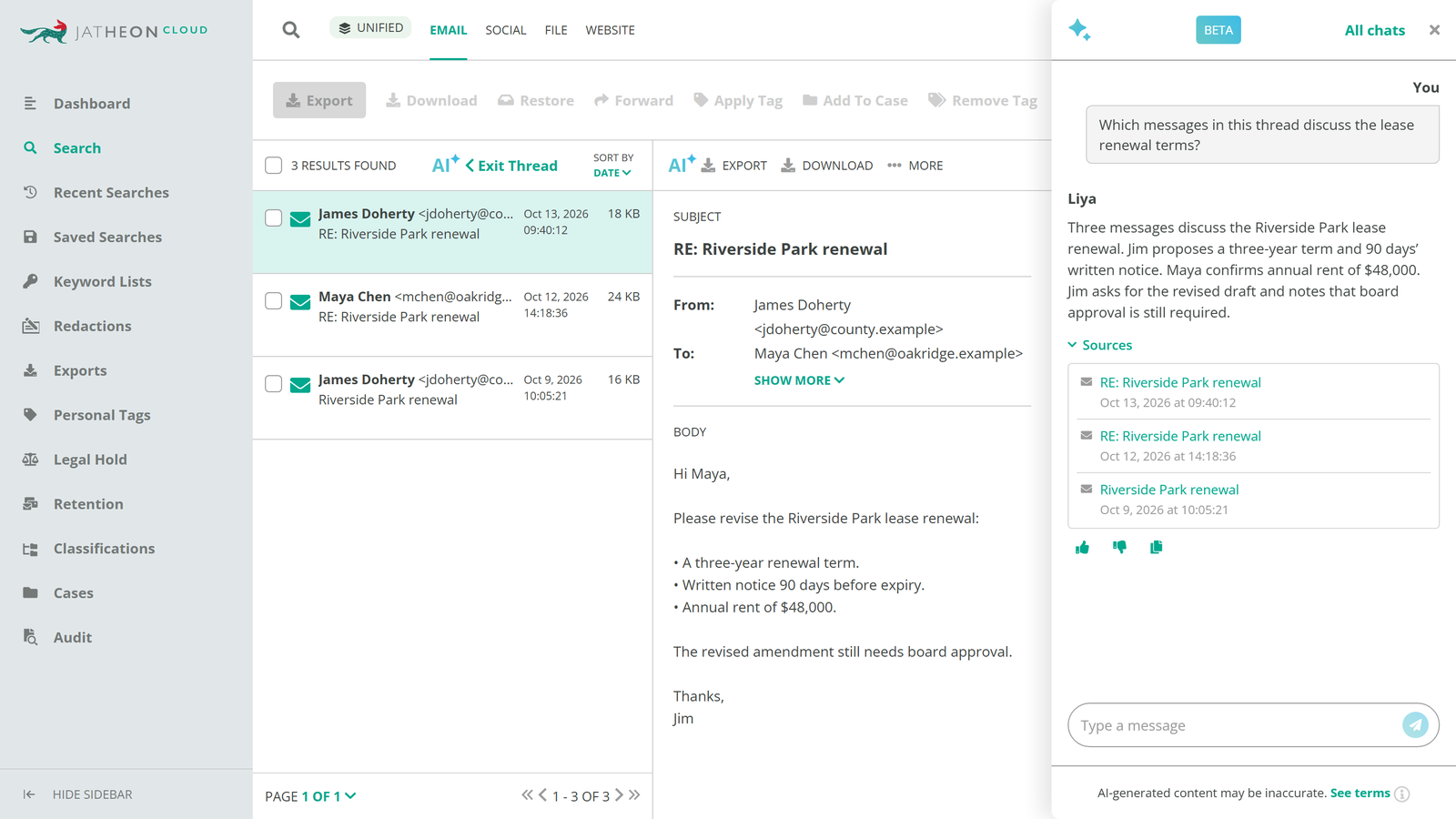
To cut that reading time, Dana can add Liya, Jatheon’s AI assistant, on top of the keyword search and ask plain-language questions about the results, such as “Which of these messages discuss the lease renewal terms?”
Liya answers about a whole result set or a single item, takes follow-up questions on its summary, and shows the sources behind each answer. That last part matters when a records officer has to explain how a record was found and why it was selected.
Liya shortens review without replacing the search: the documented keyword query is still the record of how the agency searched, and Dana still makes the final call on each record. Liya is part of the separately licensed AI module and can also be purchased as a single feature.
What Dana Can Show When the Response Is Challenged
Without one search screen, a request naming 30 terms across email and staff phones means separate searches in separate systems, a spreadsheet tracking which terms ran where, and a manual merge.
In Jatheon Cloud, Dana’s saved search holds the whole query, and it can be re-run or shared when the requester narrows or widens the scope.
The search also documents itself. An email exported to PDF carries the search criteria used to find it, and every search is recorded in the audit log. If the requester later questions if the response was complete, Dana can show exactly what ran and when.

Records teams we speak with ask for the same things: full-text search across bodies, attachments, and metadata, Boolean logic, and metadata filters in one place.