If you run Enterprise Vault, you have probably had the renewal call. Over the past few weeks, organizations we spoke with described the same pattern: a push to sign a three-year agreement, a price increase of 30% or more, and a short deadline with no room to negotiate.
Enterprise Vault has changed names twice. It was Symantec Enterprise Vault, then Veritas Enterprise Vault, and it is now sold by Arctera alongside EV Cloud and the Arctera Unified Platform. The product is the same, whichever logo is on the invoice, and so is the problem: getting your data out.
Why Enterprise Vault Customers Are Moving Now
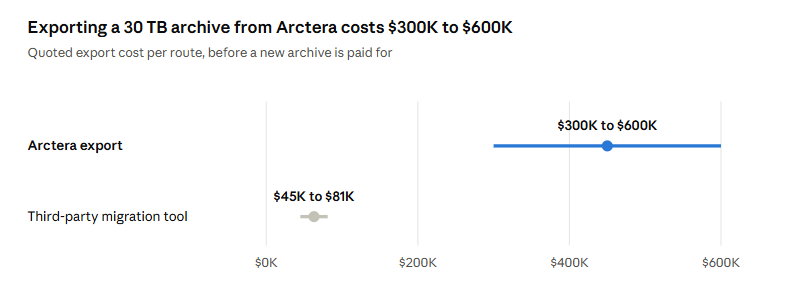
Arctera quotes roughly $10,000 to $20,000 per terabyte to export an archive. For many customers that is 1–1.5 times their annual contract value, paid just to leave.
Third-party migration tools charge $1,500 to $2,700 per terabyte, but they still depend on Arctera’s own export limits, and a standard EV export can crawl at around 1% of the archive per day.
At that rate, a 30 TB archive takes three months or more.
This guide covers both Enterprise Vault migration (Arctera) paths: on-premises Enterprise Vault (including Symantec- and Veritas-era deployments) and Arctera’s cloud archive. It also shows how Jatheon takes the cost and the delay out of both.
Two Paths Off Arctera: On-Premises and Cloud
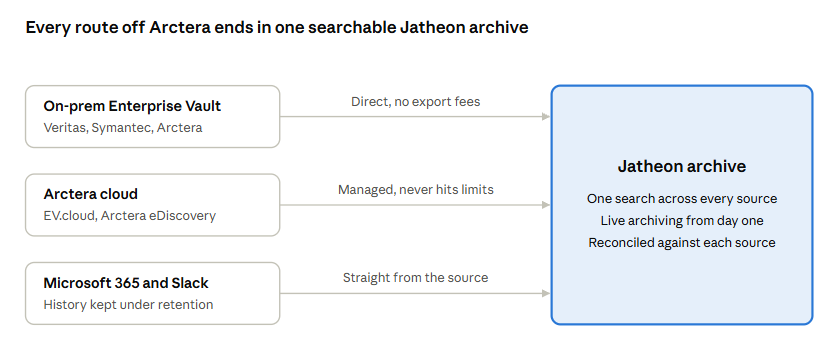
Where your archive lives decides how it comes out. Jatheon handles both natively, and many customers have a mix: an older on-prem vault plus newer data in Arctera’s cloud.
On-premises Enterprise Vault (Veritas, Symantec, Arctera)
On-prem is the easier case, and the good news for anyone facing a renewal deadline. Your data sits on your own servers, so you are not waiting on Arctera to export it.
- No Arctera export fees: Jatheon pulls the archive out directly. You don’t pay Arctera per terabyte to release your own data.
- No export queue: The migration is not throttled by Arctera’s export tools, so large vaults are not stuck at 1% a day.
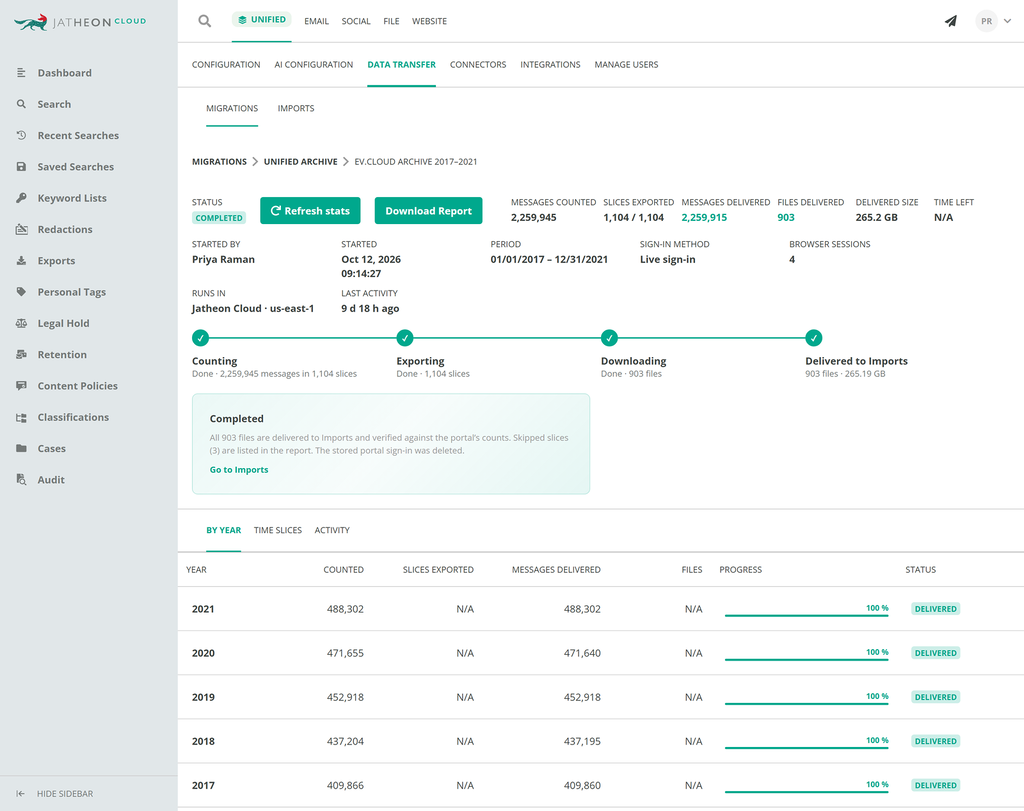
- Every vault is accounted for: Each archive is reconciled against the item count in Enterprise Vault itself, so you can see exactly what moved.
- Mailbox and journal archives: Both are migrated, with Bcc recipients and journal details kept intact.
- Light footprint: A single server next to your Enterprise Vault environment and read-only access. Nothing changes in EV while it runs.
Arctera cloud (EV.cloud and Arctera eDiscovery)
In the cloud, your data sits in Arctera’s systems, so it has to come out through Arctera’s portal. That is where most migrations stall: export limits, failed downloads and weeks of manual babysitting.
- Fully managed by Jatheon: Your administrator signs in once. Jatheon runs the rest.
- Never hits Arctera’s export limits: Jatheon sizes every export to stay under the portal’s caps, so nothing is rejected, truncated or left behind.
- Every source you archived comes across: Email, plus the Teams, Slack, Zoom and other content Arctera stored as messages, arrives searchable in Jatheon.
- Runs until it is done: Failed or stuck exports are detected and retried automatically, without a person watching a portal.
Data you may not need to export at all
If your Microsoft 365 tenant has kept mail under a retention policy, Jatheon can pull that history, including in-place archives, straight from Microsoft 365. Slack history can come directly from Slack. You then use Arctera only to fill gaps, which shrinks what you would ever pay to export.
A Six-Step Enterprise Vault Migration Plan
Most Enterprise Vault migrations follow the same 6 steps. It’s best to start them a few months before your renewal date, not after it.
- Check your contract dates: Note when your Arctera subscription or support ends and what happens to search and export access after that. On-prem data stays on your servers; cloud data is subject to Arctera’s deletion terms.
- Size the archive: Total terabytes, number of vaults or mailboxes, journal versus mailbox archives, and which sources (email, Teams, Slack, Zoom) were captured.
- Find what you can skip: Check if Microsoft 365 or Slack retention already holds part of the history. That part can come straight from the source.
- Book a technical review: A one-hour session with Jatheon confirms the best route for your environment and fixes the price before you commit.
- Start live archiving first: New email and messages flow into Jatheon from day one, so the historical migration runs in the background with no gap in coverage.
- Migrate and reconcile: Historical data moves across, each archive is counted against its source, and you get a report of what arrived before you switch Arctera off.
Arctera-Assisted Export vs. Jatheon Migration
| Arctera export or third-party tool | Jatheon migration | |
| Export cost | $10,000 to $20,000 per TB from Arctera; $1,500 to $2,700 per TB from third-party tools | Included in your Jatheon migration quote; no Arctera export fees on-prem |
| Speed | Bound by Arctera’s export limits, around 1% of the archive per day | Not throttled by Arctera’s export tools on-prem; never hits portal limits in the cloud |
| Who does the work | Your team, watching exports and re-running failures | Jatheon, end to end |
| Proof of completeness | Export logs you reconcile yourself | Every archive counted against its source, every exception listed |
| Coverage during the move | Often a gap between old and new archive | Live archiving in Jatheon from day one |
| Contract pressure | Renewal deadline drives the timeline | Migrate on your schedule, 1-year terms available |
Keeping Legal Holds, Retention and Chain of Custody Intact
An archive is only useful if it still stands up in a records request or an audit after the move. A migration has to carry the evidence, not just the messages.
- Original messages, unchanged: Messages arrive in Jatheon as they were archived, with full headers, attachments and Bcc recipients.
- Retention starts where it left off: Jatheon applies your retention rules by source, user or content, so seven-year and indefinite policies continue without a reset.
- Legal holds carry over: Items that had legal hold applied in Enterprise Vault are recreated as holds in Jatheon before anything in Arctera is switched off.
- A record of the move: You receive a reconciliation report per archive, plus a list of any item that could not be migrated and why. Nothing is silently dropped.
- No duplicates: Messages that appear in more than one vault or export are stored once.
What an Arctera (Enterprise Vault) Migration Really Costs
The export bill is only part of it. Add the staff time spent nursing exports, the months of overlap paying two vendors, and the risk of signing a three-year renewal just to buy time.
Jatheon removes most of that:
- Migration priced up front: One quote covers the move, fixed after the technical review.
- Inactive mailboxes are free: You pay only for active users, those who sent email in the last 30 days. Departed employees’ history is migrated and kept at no charge.
- Storage included: A fair-use allowance of 100 GB per user covers most historical archives with room to spare.
- No exit fees, ever: If you leave Jatheon, you have 90 days to take your data from your own encrypted storage. You pay nothing beyond standard cloud transfer costs.
- Terms that fit: One-, three- and five-year agreements. No forced multi-year lock-in.
- Training and support included: Unlimited role-based training and in-house, 24/7 support are part of the subscription.
Questions to Ask Before Your Arctera Enterprise Vault Migration
Ask Arctera
- What does it cost per terabyte to export our archive, and is that in writing?
- What happens to search and export access when our contract ends?
- For cloud customers: when is our data deleted after expiry?
- Is there a one-year renewal option at our current price?
Ask Jatheon (or any new vendor)
- Can you migrate on-prem Enterprise Vault without an Arctera export?
- How do you prove every message arrived?
- Do you charge for inactive mailboxes or historical storage?
- What does it cost to leave you?
- Will we have any gap in archiving during the move?