A Proofpoint archive migration succeeds or fails on three things: whether every message comes out, whether you can prove it, and whether archiving keeps running while the history moves. This checklist walks compliance, records, and IT teams through leaving Proofpoint Enterprise Archive in order, from the contract review to the day you switch it off.
Most teams that call us about Proofpoint have the same trigger: a renewal is coming, the price went up, and nobody is sure how long it takes to get seven years of email out.
One IT manager described a 20% renewal increase for an archive product that “has not moved in two years” despite release 6 announced in November 2026, which brought no major new features. Export forces IT to plan the exit months in advance, to have enough time to export the data. Planning a move a month before the license expires is much riskier.
Four Ways to Export a Proofpoint Archive
There are four realistic ways to get your history out of Proofpoint. They differ in cost per terabyte, speed, and who does the work.
| Option | Cost per TB | Speed | Who does the work |
| Proofpoint export | $10,000 to $20,000 | Scheduled by Proofpoint, no faster than third-party firms | Proofpoint, on its own schedule |
| Third-party export firm | $1,700 to $2,700 | About 1 to 5 TB per week | The export firm, with help from your IT team |
| Jatheon migration | About half the third-party rate | About 1 to 5 TB per week | Jatheon, after one sign-in |
| Manual export with Proofpoint’s tools | No fee, but months of staff time | Months to years | Your own staff, export by export |
For a 4 TB archive, that is $40,000 to $80,000 through Proofpoint, $6,800 to $10,800 through a third-party firm, about half of that with Jatheon, or months of your own staff’s time by hand.
Why Teams Plan a Proofpoint Archive Migration
The Proofpoint email archive does its job as a vault. The pressure usually comes from cost, contract timing, and how hard it is to leave.
- Renewal pricing: Increases arrive with the renewal quote and a short window to sign.
- Export effort: Proofpoint Enterprise Archive exports run through its discovery tools, in formats such as PST, and only users with discovery rights can run them. The cost per TB is in the range of $10,000-$20,000 from what we have seen in the field. Export speed is 10 GB per day and your export needs to be scheduled by Proofpoint.
- Third-party migration fees: Third-party export firms charge $1,700 to $2,700 per TB and move about 1 to 5 TB per week. For a 4 TB archive, that is $6,800 to $10,800 just for the migration.
- One archive for more than email: Teams that also need Microsoft Teams, Slack, Zoom, mobile, and social media in the same archive end up running a second tool next to Proofpoint.
The Proofpoint Archive Migration Checklist
Work through these 10 steps in order. Start at least three months before the renewal date, so the contract never sets your timeline.
Before you sign anything
- Read the contract end date and exit terms. Note when the subscription ends, how long you keep search and export access after that, and when Proofpoint deletes the data. Get anything unclear in writing.
- Size the archive. Record total terabytes, the number of mailboxes (including former employees), the oldest message date, and whether the archive also holds imported data from an earlier system.
- List your retention and hold obligations. Write down each retention rule (for example, seven years for financial records) and every open legal hold or records request. These decide what must move first and what cannot be deleted during the move.
- Confirm the regulations that apply. SEC- and FINRA-regulated firms must keep records in a compliant format and produce them on request, and FINRA Rule 4511 sets a six-year default where no other period applies. Government and education teams have state records schedules and public records laws to meet.
Choosing how the data moves
- Ask each vendor who does the export. If your team has to run Proofpoint exports by hand and upload PST files, budget the staff time. With Jatheon’s automated archive migration, your administrator signs in once and Jatheon handles everything after that, with no Proofpoint export fees.
- Ask how completeness is proven. “It all came across” isn’t evidence. Ask for message counts per period, checked against what Proofpoint reports, and a list of anything that was skipped and why.
- Get a fixed price. A per-terabyte quote can grow if the archive is bigger than estimated. Ask for one price after a technical review.
Running the migration
- Start live archiving on day one. Point your journaling at your new email archiving platform before the historical move begins, so new email is captured from the first day and there is no gap.
- Watch progress, not a portal. Track the migration year by year until every period is complete. Investigate any period where the counts do not match before you go further.
- Reconcile, then switch off. Download the final report, file it with your records, and only then let the Proofpoint contract end.
How Jatheon Handles a Proofpoint Enterprise Archive Migration
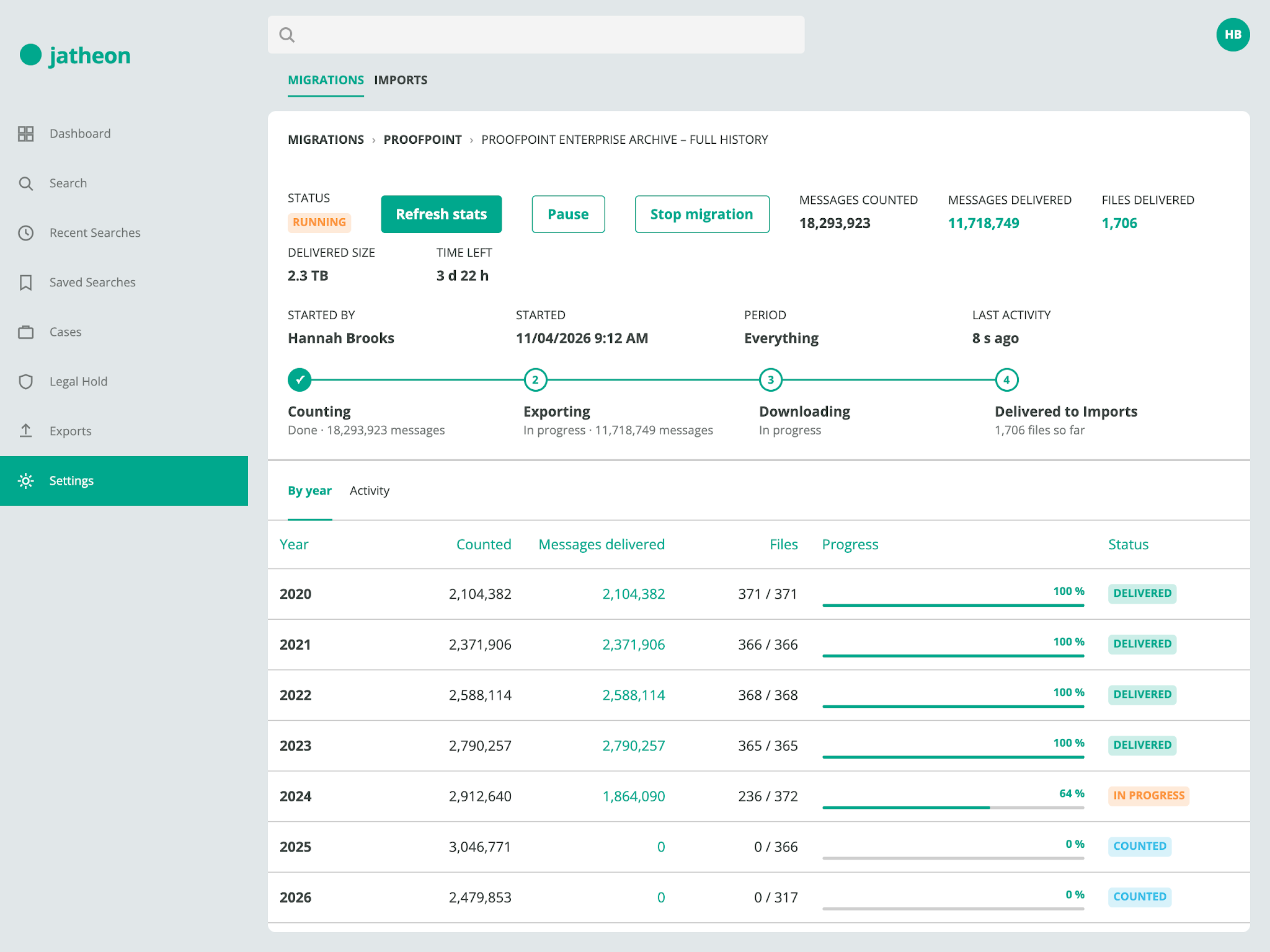
Jatheon migrates directly from Proofpoint Enterprise Archive into your Jatheon cloud archive. Your team signs in once and approves the date range. Jatheon does the rest and shows its progress in the Data Transfer dashboard.
- No Proofpoint export fees: You pay Proofpoint nothing for the export, and the Jatheon migration costs about half the third-party rate.
- Every mailbox in the date range: All archived mailboxes for the period you choose are delivered into your own Jatheon account, in your own region.
- Counts checked against Proofpoint: What Jatheon delivers is counted against what Proofpoint reports for the same period.
- Nothing silently dropped: Any item that could not be migrated is listed in a downloadable report, with the reason.
- Runs until it is done: Pause and resume keep their place. If the migration stalls, it restarts itself and Jatheon Support is alerted, so nobody has to watch it overnight.
- Audit-logged: Each sign-in and migration action is recorded in your Jatheon audit log.
A city government with seven years and roughly 4 TB of Proofpoint history is moving to Jatheon this way. Journaling into Jatheon started first, so new email is archived daily while the historical migration runs on production data in the background.
What you see in the Data Transfer dashboard
Every migration has its own page under Data Transfer > Migrations. It shows messages counted and delivered, data delivered, the time left, and a by-year breakdown so you can see exactly which periods are complete.
Each status is plain: Counting, Running, Paused, Needs decision, or Completed. The activity log and the final report are one click away.
Manual Export vs. Jatheon Proofpoint Migration
| Manual export or third-party tool | Jatheon migration | |
| Who does the work | Your team runs exports, checks files, and uploads them | Jatheon, after one sign-in |
| Cost | Months of staff time by hand, or $1,700 to $2,700 per TB from a third-party firm | About half the third-party rate, fixed after a technical review |
| Proof of completeness | Export logs you reconcile yourself | Counts checked against Proofpoint, skipped items listed in a report |
| Failures | Found later, re-run by hand | Restarted automatically, Support alerted |
| Coverage during the move | Often a gap between old and new archive | Live archiving from day one |
| Visibility | Spreadsheets and email updates | Data Transfer dashboard with year-by-year progress |
Keeping the Archive Defensible During the Move
A regulator or a records request does not pause for a migration. Two rules keep you covered.
- Keep Proofpoint until the report is filed. Don’t let the old archive lapse until the final reconciliation report is complete and saved. That report is your evidence that the records were transferred intact.
- Check the storage rules for the new archive. Since the SEC’s 2022 amendments to Rule 17a-4, broker-dealers can meet the electronic recordkeeping requirement with WORM storage or an audit-trail system. Either way, records must stay complete, accurate, and producible. Jatheon supports SEC Rule 17a-4 compliance with WORM-compliant storage and a full audit trail.
Search is the other half. Once the history is in Jatheon, it sits alongside your Microsoft 365 email, Teams, Slack, Zoom, and mobile messages, so one ediscovery search covers all of it.
What It Costs to Leave Proofpoint
The export bill is only part of the cost. Add the staff hours spent running exports, the months of paying two vendors, and the risk of signing another multi-year renewal just to buy time.
- Migration priced up front: One quote covers the move, fixed after the technical review.
- Inactive mailboxes are free: Former employees’ history is migrated and kept at no extra charge. You pay for active users.
- No exit fees: If you ever leave Jatheon, you take your data with you without paying an export fee to us.
- Terms that fit: One-, three-, and five-year agreements are available.
Questions to Ask Before Your Proofpoint Archive Migration
Ask Proofpoint
- When does our archive data get deleted after the contract ends?
- How long do we keep search and export access after expiry?
- Is a one-year renewal available at our current price?
Ask Jatheon (or any new vendor)
- Who runs the Proofpoint export, and what do you need from us?
- How do you prove every message arrived?
- Do you charge for inactive mailboxes or historical storage?
- Will we have any gap in archiving during the move?
- What does it cost to leave you?