A Barracuda archive migration moves your historical email out of a Barracuda Message Archiver appliance or the Barracuda Cloud Archiving Service and into a new archive, while live capture switches over without a gap.
On-premises appliances can be migrated directly from their backups. Cloud archives need a paid export from Barracuda’s own team first, and that export queue usually sets your timeline.
If you run a Barracuda archiver and your renewal is three to six months out, you already know the tension. Choosing the replacement is the quick part. Getting 10 or 15 years of journaled email out of Barracuda intact, searchable, and defensible is where the weeks go, and where compliance and legal teams start asking questions.
This guide covers:
- The parts of a Barracuda archive migration that teams underestimate,
- A seven-phase plan,
- The questions to put to Barracuda and to your next vendor, and
- How to keep legal holds and retention intact through the move
Why a Barracuda Email Archive Migration Can’t Wait for the Renewal Date
Start planning at least 90 days before your Barracuda contract ends. The export alone can take two weeks or more for a large cloud archive, and you can’t search data that hasn’t landed in the new system yet.
- Renewal deadlines don’t move: If the export starts late, you either renew for another term or pay for two archives while the data moves.
- Appliances hit capacity: Teams running a Barracuda Message Archiver near its storage limit often face a forced upgrade to a larger model when they only need 1 to 2 TB more.
- Offsite copies changed: Barracuda discontinued the Message Archiver Cloud Storage feature in 2024, so appliances that relied on it for an offsite copy no longer send data there.
- Records requests now cover more than email: FOIA and open records requests increasingly name text messages, iMessage, Teams chats, and social media posts. Most Barracuda archives our team sees in demos capture email only.
What Makes a Barracuda Archive Migration Harder Than It Looks
Most delays come from five places: the deployment type, Barracuda’s export process, export fees, settings that don’t travel with the data, and legacy content such as stubs or Sonian-era mail. Check each one before you sign anything.
Cloud and on-premises are two different migrations
An on-premises Barracuda Message Archiver stores its data on hardware you control, so a new vendor can read it from the appliance’s backups. Jatheon migrates on-premises Barracuda data directly from those backups, such as the appliance’s nightly NFS backup, without a third-party migration tool.
A Barracuda cloud archive is different. There’s no export API a new vendor can call, so the data has to come out through Barracuda first. Plan the project around that dependency.
The export queue sets your timeline
For the Barracuda Cloud Archiving Service, paid bulk exports start with a sales quote, then a support case. Barracuda’s documentation says its migration team then creates the exports manually, in PST or ZIP format, and you’re responsible for downloading them. In one 2026 evaluation, a buyer with an estimated 12 to 13 TB archive was told to expect about two weeks for the export alone.
Export fees scale with volume
Barracuda prices paid exports by data volume, and the quotes vary. One county government we worked with in 2026 was quoted $14,000 to export 1 TB. We use about $600 per TB as a reasonable benchmark when buyers ask what to expect, and the fee is often negotiable.
Retention policies and legal holds stay behind
An export contains messages, not the rules around them. Retention schedules, legal holds, saved searches, user roles, and the audit log of who searched what all stay in Barracuda. You’ll rebuild them in the new archive and keep a record of the old ones.
Stubs, departed users, and Sonian-era data
Three smaller items cause most of the surprises:
- Mailbox stubs: If you used Barracuda stubbing to shrink mailboxes, the stubs in Outlook point to the old archive and break once it’s gone.
- Departed employees: Mailboxes for former staff often exist only in the archive. Confirm they’re in the export scope, since they’re usually the ones legal asks for.
- Legacy Sonian data: Some Barracuda cloud archives still hold data from the Sonian platform Barracuda acquired. Barracuda’s documentation says some of that data can’t be migrated between its own systems and recommends exporting it in advance.
A Seven-Phase Barracuda Archive Migration Plan
The safest order is to start live capture in the new archive first, then move historical data behind it. That way new mail is never at risk, and Barracuda stays available for searches until you’ve validated the migrated copy.
1. Inventory what’s in the Barracuda archiver
Record the facts you’ll need to plan and, later, to prove completeness:
- Product and deployment: Message Archiver appliance (model and firmware) or Barracuda cloud archive
- Total storage in TB, item count, and the oldest and newest message dates
- Active and departed user mailboxes, shared mailboxes, and any Sonian-era data
- Active legal holds, retention policies, and stubbing settings
- Contract end date and the notice period for cancellation
Ask Barracuda for item counts per mailbox now. You’ll use them in phase 6.
2. Start live capture in the new archive
Point journaling or the Microsoft 365 or Google Workspace connector at the new archive before any historical data moves. From that day forward, new mail lands in Jatheon’s email archiving, and Barracuda only holds the past. At this stage, many teams add the channels Barracuda never captured, like text message archiving or Teams and Zoom archiving.
3. Extract the historical data
The extraction path depends on the deployment:
- On-premises Message Archiver: Make the full Barracuda backup available on a shared drive the new system can reach. Jatheon reads the backup directly, with no export from Barracuda required.
- Barracuda cloud archive: Request a bulk export from Barracuda and ask for delivery straight to an S3 location Jatheon provides. If Barracuda offers SFTP instead, plan for parallel downloads; our support team pulled 1 TB in about 16 hours using 10 parallel connections.
4. Ingest and index
Once the files land, ingestion is automated. Jatheon migrates Barracuda data at 5–6 TB per week, so a 10 TB archive typically completes in one to one and a half weeks. Smaller archives move faster: a recent half-terabyte migration was estimated at 3–5 business days.
5. Rebuild holds, retention, and access
Re-create every active legal hold first, then retention policies, then user roles. Wait to give employees access to their own archived mail until the import finishes. Searches against a partial archive return partial results, which creates confusion and support tickets.
6. Validate before you trust it
Compare item counts by mailbox and date range against the inventory from phase 1. Then rerun two or three past FOIA requests or ediscovery searches in both systems and compare the results. Keep the export manifest, the import log, and your comparison results together as your record of completeness.
7. Decommission Barracuda
Export Barracuda’s audit logs and a record of its retention and hold settings before access ends. Confirm in writing what Barracuda does with your data after the contract closes, and request confirmation of deletion. Only then stop searching Barracuda and let the contract lapse.
Barracuda-Assisted Export vs. Self-Service Export
For a Barracuda cloud archive, you have two ways to get the data out: pay Barracuda’s migration team to run a bulk export, or have your own admin export it from the interface. Above roughly 25 GB, or when you need every mailbox and every year, the assisted export is usually the safer choice.
| Barracuda-assisted bulk export | Self-service export by your admin | |
| Who does the work | Barracuda’s migration team, under a quote and support case | Your IT staff, through the Barracuda interface |
| Cost | Volume-based fee, often negotiable (about $600/TB is a fair benchmark) | No export fee, but staff hours |
| Typical timeline | Set by Barracuda’s queue; about two weeks quoted for 12–13 TB | About a week for a mid-size firm of roughly 240 users |
| Delivery | Direct to your new vendor’s S3 location, or SFTP download | Files you download and upload yourself |
| Completeness risk | Lower: full scope agreed in writing | Higher: easy to miss departed users or date ranges |
| Best fit | Large archives, public agencies, regulated firms | Small archives with a simple scope |
For an on-premises Barracuda Message Archiver, neither export is needed: Jatheon can read the appliance backup directly.
Keeping Legal Holds, Retention, and Audit Trails Intact
Your obligations don’t pause during a migration. Every record under a hold or a retention schedule has to stay preserved and retrievable in at least one system on every day of the project. Running Barracuda and the new archive side by side until validation is what makes that true.
- Legal hold: Re-create holds in the new archive before you rebuild anything else, and keep Barracuda searchable until they’re confirmed.
- Retention: Make sure original sent and received dates survive the import, and map each Barracuda policy to its replacement.
- Open records requests during the migration: Until validation is done, search both systems and record which system each result came from. One county we worked with ran its FOIA searches in both Barracuda and Jatheon while its 1.5 TB import finished, then retired Barracuda.
- Chain of custody: Keep three things together for each data set: the export manifest from Barracuda, the import log from the new archive, and your count reconciliation. Together they show what left one system, what arrived in the other, and that nothing was altered on the way.
Barracuda Archive Migration Costs
The direct cost of a Barracuda archive migration is the export fee. The larger costs come from delay: paying two vendors, searching two systems, and defending gaps you can’t explain.
- Export fees: Quotes we’ve seen run from about $600 per TB to $14,000 for a single terabyte. Get the quote in writing before you sign with anyone.
- Dual licensing: Every week the export runs past your contract end date is a week of paying for two archives. A late start can push you into another full renewal term.
- Staff time: While data sits in two places, every records request takes two searches, two exports, and a merge.
- Defensibility: If an item count doesn’t reconcile and you can’t say why, that gap becomes a problem in litigation or an audit. Fixing it after Barracuda access ends is much harder.
- The next exit: A vendor that charges heavily to export your data later will cost you again. Ask now.
Questions to Ask Before Your Barracuda Migration
These questions surface most timeline and cost problems before the contract is signed:
Questions for Barracuda
- What is the export fee for our total volume, and is it negotiable?
- How long is the current export queue, and when can work start?
- Can you deliver the export directly to our new vendor’s S3 location?
- Which formats are available, and does the export keep journal data such as BCC recipients?
- Does the scope include departed users, shared mailboxes, and any Sonian-era data?
- How long do we keep access after the contract ends, and how is our data deleted?
Questions for your next archive vendor
- Do you migrate our Barracuda deployment natively, or through a third-party tool?
- What ingestion speed should we expect, in TB per week?
- Is migration included, or priced separately?
- How will we confirm the migration is complete?
- What will it cost to export all our data if we leave you?
How Jatheon Handles Barracuda Migration
Jatheon has native Barracuda migration, which runs through the Data Transfer Dashboard in Jatheon Cloud. Once the Barracuda files reach the Jatheon S3 location, ingestion and indexing run automatically at 5 to 6 TB per week.
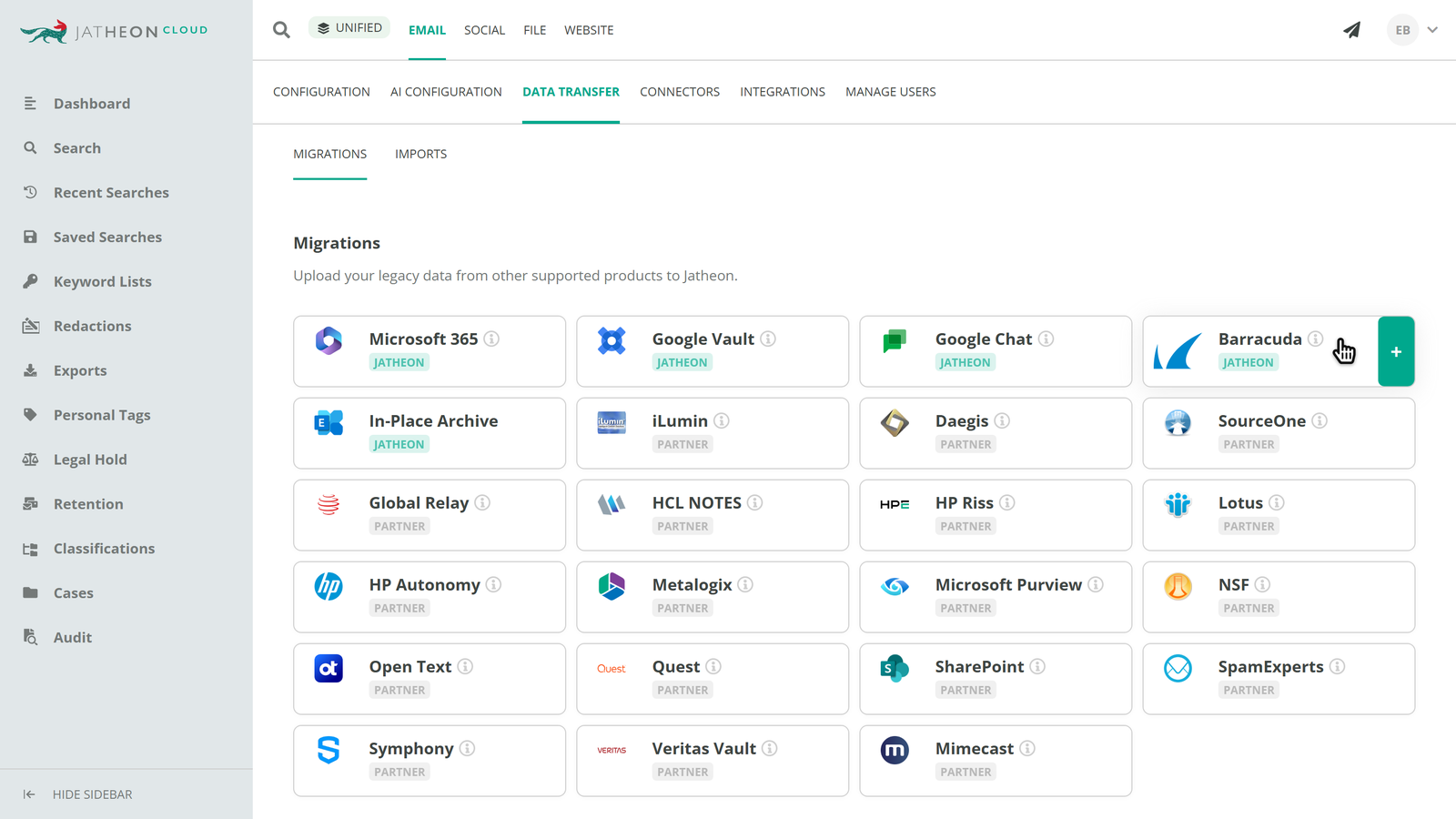
For on-premises Barracuda Message Archiver customers, Jatheon reads the appliance backup directly, whether you move to Jatheon Cloud or stay on-premises with a Jatheon appliance or virtual machine.
For Barracuda cloud archive customers, we work with the export Barracuda delivers and can give Barracuda a Jatheon S3 location to send it to, so nothing passes through your network. Live capture through journaling or the Microsoft 365 connector starts on day one, so there’s no gap in new mail while historical data moves.
Jatheon doesn’t lock your data in. Your archive sits in its original format in encrypted AWS S3 storage, and a full exit export carries only a nominal fee of about $600 per TB to cover AWS data transfer.